
Compact the context automatically
When a turn ends with the context over a token mark, VCode runs a
compaction turn of its own before the next message goes in. You can set the mark
for every tab in the settings sheet, or for one tab with /autocompact.
Why you would use it
A long thread gets slower and dearer with every turn, and eventually the agent runs out of window mid-answer. Compacting on a mark you choose keeps that from happening while you are not watching, and because it runs between turns it never lands in the middle of work.
How to use it
For every tab:
- Tap the cog (
#settings-open) and find the Auto compact group (#settings-autocompact). - Switch
Enabled(#ac-enabled) on or off. - Set
Context tokens limit(#ac-tokens), a number with atokensunit beside it. - Optionally write a
Custom prompt(#ac-prompt) saying what to keep.
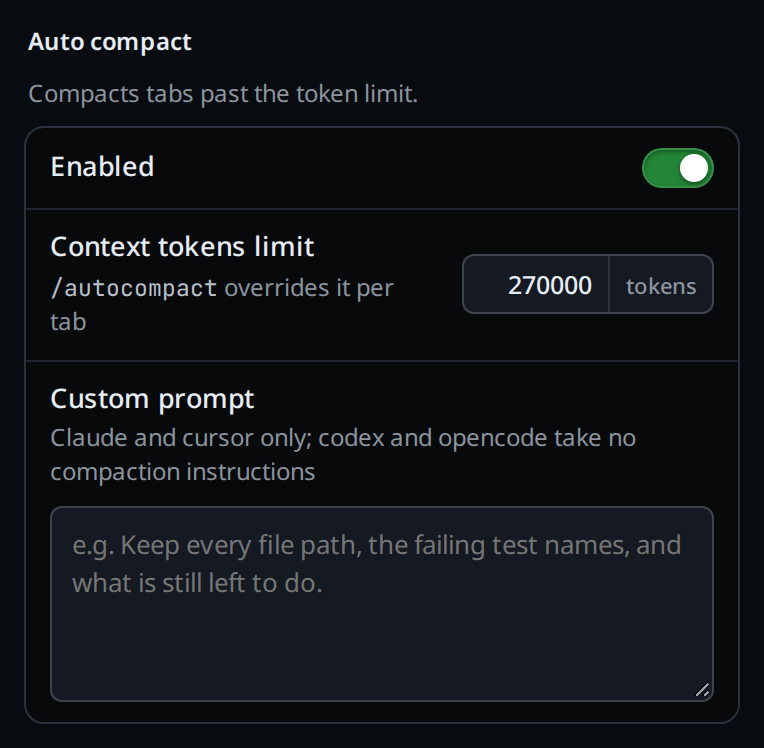
Each field saves the moment it changes; there is no Save button. The status at
the right of the group title (#settings-hint) reads Saving…, then a green
check and Saved. A refused value shows in red there, for example
a whole number of tokens, at least 10000.
The group's help reads Compacts tabs past the token limit., and the limit's
row adds /autocompact overrides it per tab.
For one tab, type in the composer:
/autocompact: reports this tab's mark/autocompact 120k: compact over 120,000 tokens/autocompact off: never compact this tab/autocompact default: follow the settings sheet again
To compact a codex, cursor, devin, copilot or muse tab now, type /compact. VCode runs the same
compaction turn it runs on the mark. On claude and opencode, /compact goes to
the agent itself.
What you see
A system card opens in the transcript before the compaction:
auto-compacting: context at 312k, over the 270k mark, with a timer counting up
beside it. The activity line says COMPACTING. When it is done the same card
reads auto-compacted: context was at 312k, over the 270k mark and closes with
the final duration; the 30-second heartbeats the CLI sends collapse into that
one card rather than adding more. The agent's own compaction card lands on this
one, so an automatic compaction is a single row. A /compact you type on claude
or opencode shows the agent's card alone: compacting context…, then
context compacted. On codex, cursor, devin, copilot and muse it shows compacting: context at 120k,
then compacted: context was at 120k (no figure on cursor, which reports none).
A compaction's card is tagged COMPACT and wears a compaction icon (two arrows
pressing on a line) where other system notes wear SYS. It keeps both after the
compaction ends, so you can find where the context was cut when you scroll back.

If the compaction fails, the same card becomes a warning:
auto-compact failed: <reason> (compact failed: <reason> for a typed
/compact), or the agent's own words, such as compaction failed: <reason> on
claude.
On cursor: compaction by summary
Cursor has no compact command of its own, so VCode asks it for a summary
instead. The compaction turn sends cursor a prompt asking it to summarise the
conversation: your goals, the decisions made, the state of the work and what is
left. Its answer shows in the transcript like any reply. VCode then ends
cursor's session. Your next message starts a new session, with the summary sent
ahead of it. The transcript stays on screen. If cursor's turn fails, is stopped
or writes nothing, the session is kept as it was and the card says why, for
example compact failed: cursor wrote no summary.
On claude the ctx segment in the status bar drops to the
size of the summary as soon as the compaction ends, whether it was automatic or
a typed /compact. On codex and opencode it keeps the old figure until the next
turn reports usage. Tapping
that segment says context 312000 tokens · auto compact 270k tokens, or
context 312000 tokens · auto compact default on a tab that follows the sheet.
/autocompact toasts its result, for example auto compact: 120k tokens,
auto compact: off, auto compact: default.
Options and settings
| Option | Default | What it changes |
|---|---|---|
Enabled (#ac-enabled) |
on | Whether any tab compacts on its own |
Context tokens limit (#ac-tokens) |
270000 | The mark, in tokens. At least 10000 |
Custom prompt (#ac-prompt) |
empty | Instructions for the summary. Claude and cursor only; codex, opencode, devin, copilot and muse take no compaction instructions. At most 4000 characters |
/autocompact <n>k|off|default |
default | This tab's own mark. off beats settings that are on; a mark beats settings that are off |
VCODE_AUTO_COMPACT |
270000 | Seeds the mark on a state root with no settings.json yet. 0 seeds it off; anything else must be at least 10000 or the boot fails |
Limits and known gaps
- The custom prompt reaches claude and cursor only. Codex, opencode, devin, copilot and muse take no compaction instructions.
- Cursor reports no context size, so the mark never fires on a cursor tab. Type
/compactthere instead. Devin, Copilot and Muse report their size, so the mark fires on a devin, copilot or muse tab. - On cursor the summary is the only thing the new session keeps. Anything it left out is gone from the agent's memory, though it stays in the transcript.
- A typed
/compacton codex or cursor is refused while a turn runs (stop the running turn before compacting), on a tab with no session yet (nothing to compact yet), and while a usage retry waits (a retry is waiting for the usage limit; compact after it runs). - On cursor a summary cut short (
max_tokens) or refused counts as a failure: the session is kept. - Only after a turn that finished on its own. A turn you stopped, or one that errored or failed (including one a usage limit cut short) is not followed by a compaction.
- Never after a compaction turn itself. Codex and opencode report no usage on that turn, so the figure is still the old one when it ends and re-checking it would loop.
- The mark is re-checked at drain time, so a
/clearor a handoff between the turn ending and the compaction cancels it. - A usage limit reported after the turn closed cancels the pending compaction, so the retry is not queued behind it.
- The compaction is a turn of VCode's own, so it costs tokens and takes time before your next message runs.
/autocompacttakes120k,120000,off,0,defaultorauto. Anything else is refused withauto compact takes a token count like 120k, or off, or default. A bare decimal is refused:0.1would round to 0 and switch compaction off without anyone asking.- The tokens field refuses anything under 10000.
- A message sent while a compaction runs waits:
<agent> is compacting its context; the message runs when that ends. A steer during a compaction waits too. - Once
settings.jsonexists it wins overVCODE_AUTO_COMPACT, so a setting changed on the phone is not reverted by the nextinstall.sh update.
Related
- clear-the-context: drop the context instead of summarising it
- status-bar: where the
ctxfigure lives - activity-line: the
COMPACTINGlabel - hand-a-tab-to-another-agent: the other way a thread starts fresh
- read-the-transcript: where the system card lands
- synced-settings: these settings follow you to the account's other workstations