
Send after dictating
Turn this on and the draft sends itself 1 second after a dictation's words land in the composer. A toast with Cancel shows during the wait, and the send key turns round while a white ring fills along its edge until the draft goes.
Why you would use it
You talk to the agent without looking at the screen. Tapping send after every sentence breaks that. The wait is your chance to stop a transcript that came out wrong.
How to use it
Open the cog (
#settings-open). In the Voice group, switch on Send after dictating (#voice-auto-send). The group saysSaved.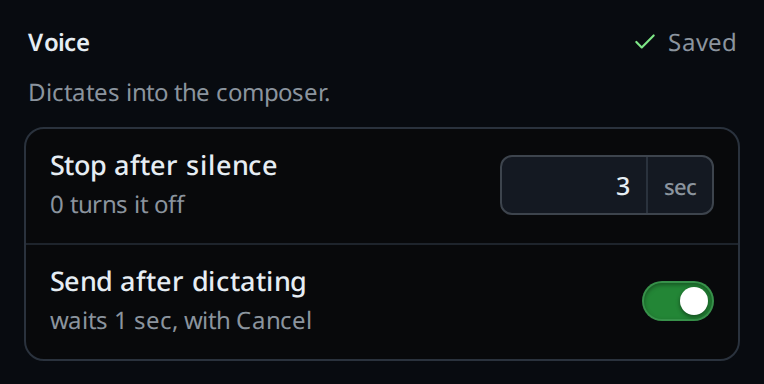
Dictate as usual. When the words land, the toast reads
Sending…with a Cancel button (.toast-action). The send key (#send) turns round, and a white ring fills along its edge from the top over the second.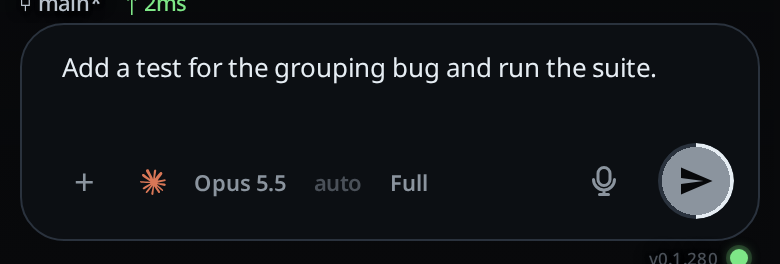
Do nothing and the draft sends as if you had tapped send. It sends the whole draft, including text that was already in the composer.
What you see
- Cancel in the toast, typing in the composer, or any send, ends the wait. The key goes back to its usual shape. A second dictation inside the wait starts the ring again.
- With reduced motion on, the ring is drawn whole for the wait instead of filling. Cancel and typing leave the draft where it is. A send key tap sends at once.
- Nothing sends when the transcript is empty, when the transcription failed,
or when the words went to a tab you left (
dictated into the tab you left,that tab is gone; dictated here). - Nothing sends in shell mode, or when the draft starts with
/. - Switching tabs inside that second sends nothing.
Options and settings
| Option | Default | What it changes |
|---|---|---|
Send after dictating (#voice-auto-send) |
off | Sends the draft 1 second after a transcript lands in the front tab |
Limits and known gaps
- The wait is fixed at 1 second.
- The setting is per box, not per device.
Related
- dictate-a-message: where the words land
- stop-recording-on-silence: the other Voice setting
- send-a-message: what a send does
- read-a-reply-aloud: hear the reply without looking