
Claude Code Remote Control vs VCode
If you only use Claude Code and the conversation is all you need on your phone, use Remote Control. Both run the agent on your own computer and let you drive it from your phone. Remote Control is Anthropic's, and it drives Claude Code only. VCode drives Claude Code, Codex, OpenCode and Cursor, and you can switch between them in the middle of a conversation. It starts sessions in any folder from your phone and moves between many of them fast, and one agent, the Agent Commander, can run your other tabs for you. It shows you each step the agent takes, and gives you the files, a shell and web pages from that computer as well.
Side by side
| Remote Control | VCode | |
|---|---|---|
| Use the computer yourself | No. You talk to Claude, and Claude runs commands for you | Yes. A shell on the computer from your phone, plus its files, its web pages and its agents |
| One agent that runs the others | No | Yes. Tell the Agent Commander what you want; it starts tabs for the work, sends them messages, waits for them and reports back |
| Agents | Claude Code | Claude Code, Codex, OpenCode and Cursor |
| Switch agent mid-conversation | No | Yes. Same tab, same history; the new agent reads a summary of the work so far |
| Sign-in | Your claude.ai account. No API key, Bedrock or LLM gateway | Your VCode account. Each agent uses the login it already has on your computer |
| On the phone | The Claude app on iPhone and Android, or claude.ai/code | app.fezu.dev in the browser, or added to the home screen |
| On a computer | claude.ai/code, Claude Desktop | app.fezu.dev, or the VCode desktop app on Windows, Linux and the Mac |
| Start a session from the phone | Only in a folder you connected first: claude remote-control left running in it, or the folder added to a list in Claude Desktop | Yes, in any folder on any of your computers. Type the path or browse to it |
| Several computers | Yes, one session list | Yes, one row of tabs with a badge per computer |
| Moving between sessions | A session list in the Code tab | Tabs you swipe between, each marked when it finished or waits for you; search, projects, keyboard shortcuts, and up to six panes side by side on a wide screen |
| What you see of the work | The conversation, with tool activity and the progress of subagents and workflows | Its thinking, every command with its output, every edit as a diff, a live line saying what it is doing now, and a Proof at the end with the checks it ran, its screenshots and its diff |
| Changes | A diff pane of the session's changes | A diff you scroll like a pull request. A comment on a line of a file goes to the agent |
| Files | Type @ to name a file in a message | Type @ to name a file in a message, plus a file tree, a viewer and an editor with language servers; make, rename and delete files |
| Shell | No. A line starting with ! goes to Claude as a message | A terminal for each tab, and a line starting with ! runs in the tab's folder |
| Web pages from your computer | No | A dev server or HTML file opens at a private https address only your devices can open |
| A session started in a plain terminal | Reachable only after you run /remote-control in it | Find a Claude or Codex session by what was said in it, and pick it up from the phone |
| Logins and MCP servers | /mcp on the phone gives a text summary. Logging in to a connector needs a terminal on the computer | From the phone: log an agent in or install one, and log in to an MCP server, reconnect it or remove it |
| Permissions from the phone | You can make Claude ask before it acts, or let it decide. You cannot let it run everything without asking from the app | You pick from the phone: ask first, let the agent decide, or run everything without asking |
| Usage limit | Wait for the reset | Meters for Claude and Codex, and one tap hands the tab to Codex or to a free model in OpenCode |
| Notifications | Claude app push, when Claude decides or needs you | A push when a tab finishes or waits for you. On an iPhone, add the app to the home screen first |
| Transcript | Stored on Anthropic's servers while connected | Stays on your computer |
| Closing the terminal | The session goes offline | Nothing stops. VCode runs in the background |
When Remote Control is enough
- You use Claude Code and no other agent.
- You want to watch and steer a session you started at your desk, and the conversation is all you need on the phone.
- You want nothing else to install. Run
claude remote-controlin your project, or/remote-controlin a session you have open, and scan the QR code.
Remote Control does not work when Claude Code signs in with an API key, goes through Amazon Bedrock or Google Cloud, or points at an LLM gateway.
When VCode fits better
You want one agent to run the others
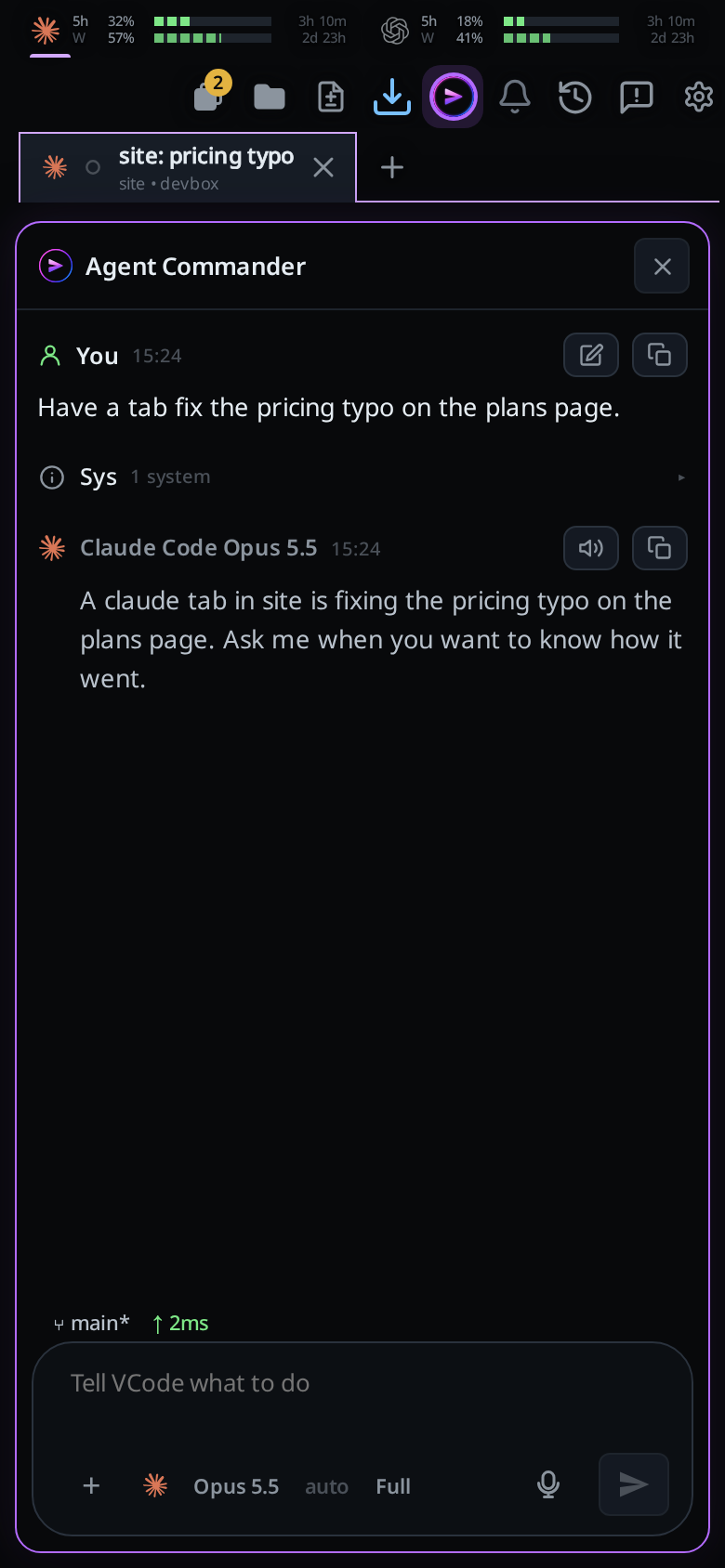
The Agent Commander is one assistant for your whole account. Tap the VCode icon in the top bar, or type /commander, and tell it what you want, typed or dictated: "have a tab fix the pricing typo", or "what is the codex tab stuck on?". It starts a tab for each piece of work with your words as its prompt, sends tabs messages, waits for them, reads their replies and tells you what happened.
It sees every project and tab on the computer it runs on, and it keeps working there with your phone locked. It can answer "what finished while I was out?" from a log of every tab that finished or needed you. When a tab asks permission, the Commander can pass the request to you as a card in its own conversation. It does nothing until you talk to it.
You run lots of sessions and move between them fast
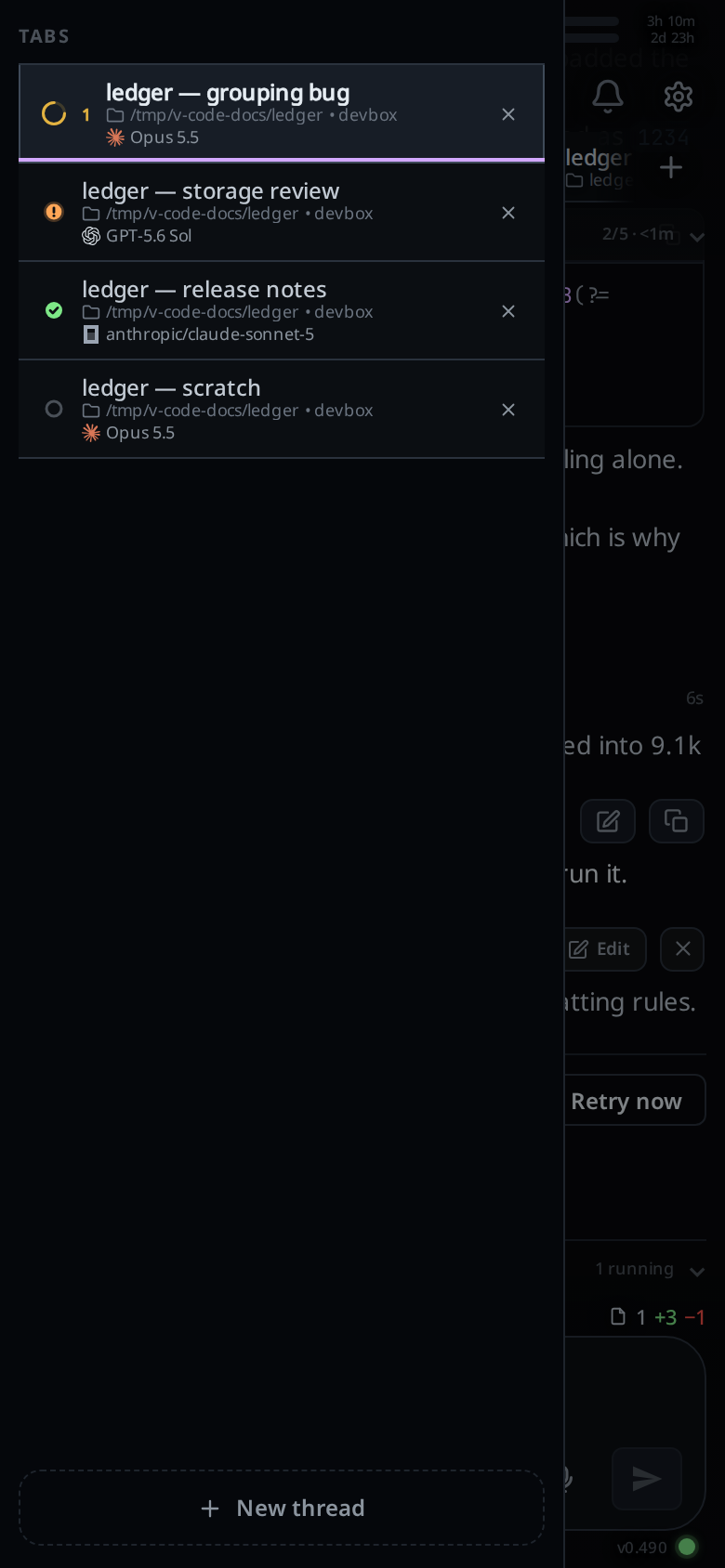
Each session is a tab. Start one in any folder on any of your computers: type the path or browse to it, with nothing to run on the computer first. /new opens another from the message box. Swipe the conversation sideways to move to the next tab, and each tab keeps its half-written message.
A tab whose agent stopped for you gets an orange !, a finished one a green tick, and the Tabs button counts them. Group tabs into projects, search them by what was said, and on a computer use keyboard shortcuts or split the window into up to six panes side by side, each with its own message box.
You use more than one agent, or want to switch mid-conversation
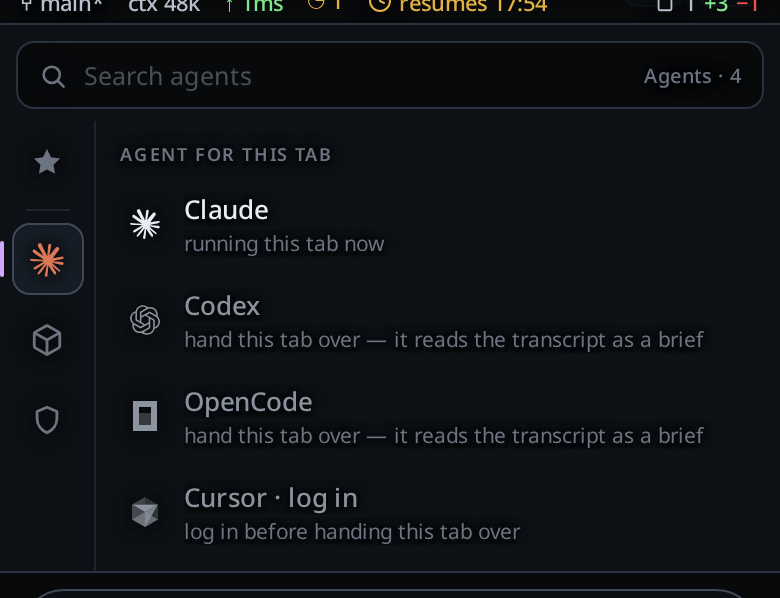
A tab runs Claude Code, Codex, OpenCode or Cursor, and tabs on different agents sit side by side, each on the model you pick for it. You can also change the agent on a tab without losing the conversation. Tap the agent button under the message box and pick another: the tab keeps its title and history, and the new agent reads a written summary of the work with your next message.
Switch when Claude hits its usage limit and Codex, or a free model in OpenCode, can carry on. Switch when one agent has gone in circles and you want a second opinion with the same context, without retyping anything. The usage limit guide has the steps.
You want to see what the agent is doing
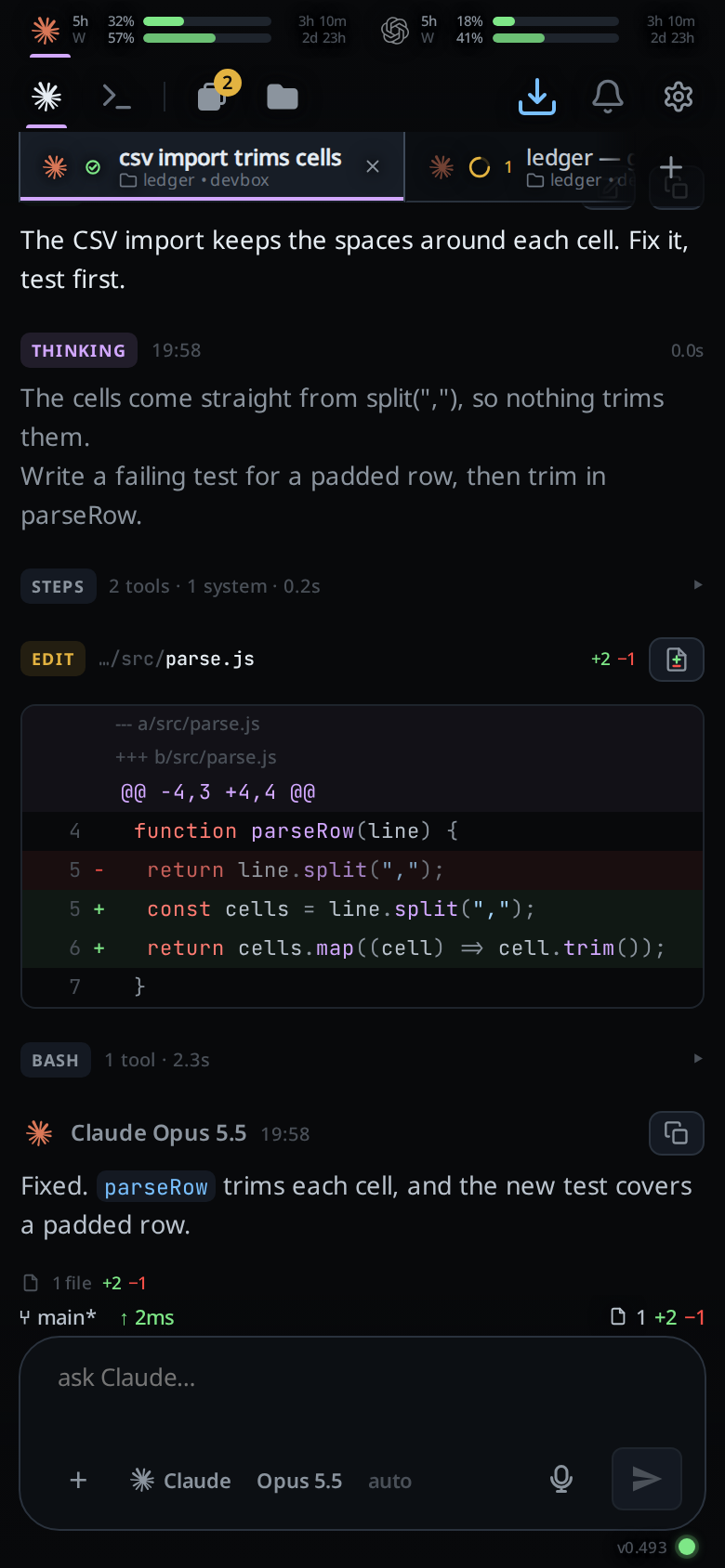
The conversation shows the agent's thinking, every command it ran with that command's output, and every file it edited as a diff, in the order they happened. While a turn runs, the last line says what the agent is doing right now and how long the turn has been going, so a quiet minute inside a long command does not look like a hung app. A strip above the conversation follows the agent's plan step by step, and another under it shows its subagents.
On a phone that is a lot to scroll, so you choose how much of each kind shows: in full, grouped into one row you can open, or hidden. When the agent finishes a change, its last reply carries a Proof: the checks it ran and what they said, the screenshots it took, and the full diff of its work.
You fix things without a terminal
When Claude or Codex is logged out, the tab says so and offers the login there; you finish it on your phone and VCode sends your message again. An agent that is not installed has an Install button. /mcp opens a list of the agent's MCP servers, where you log in to one, reconnect it, turn it off or remove it. A Claude or Codex session you started in a plain terminal at your desk comes up on the phone when you search for a few words from it.
You want to read and fix the code yourself
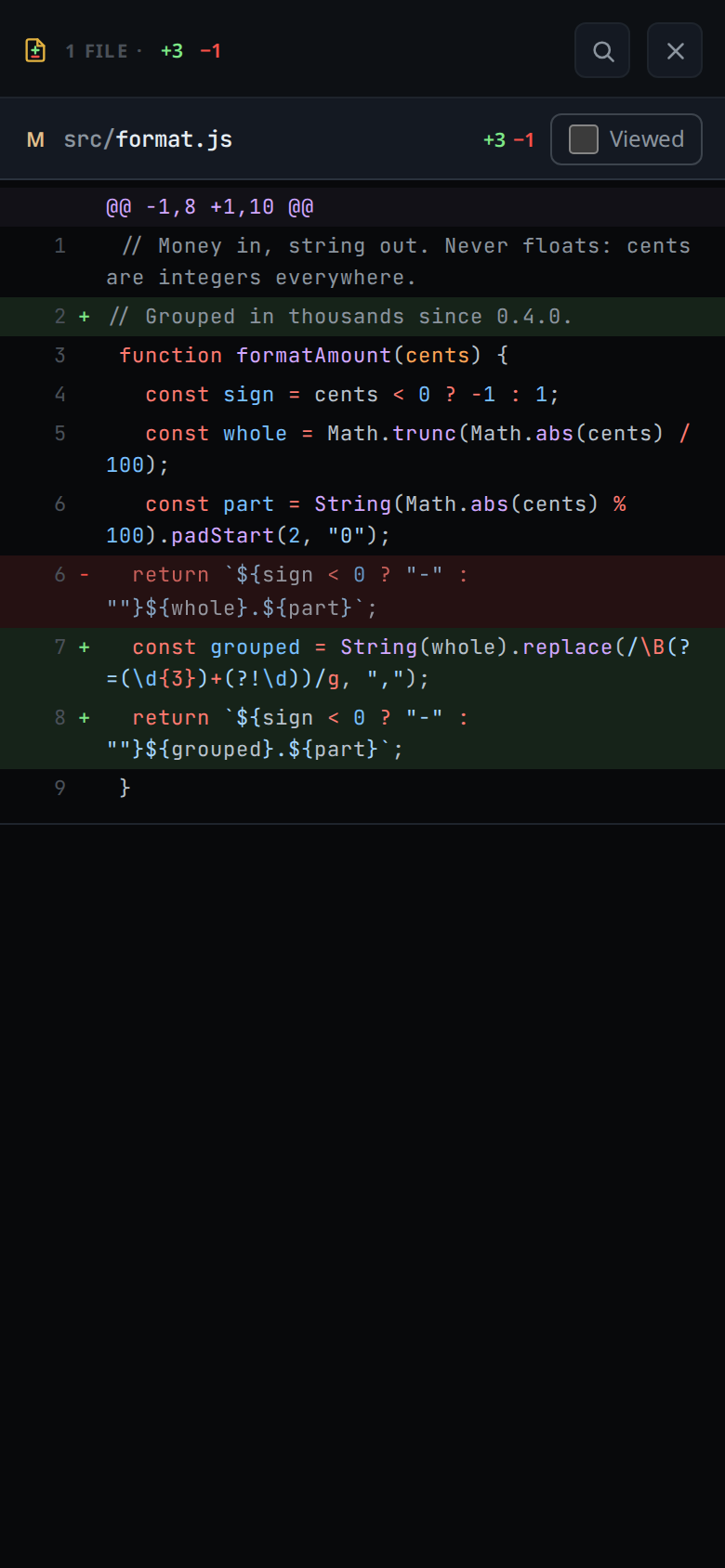
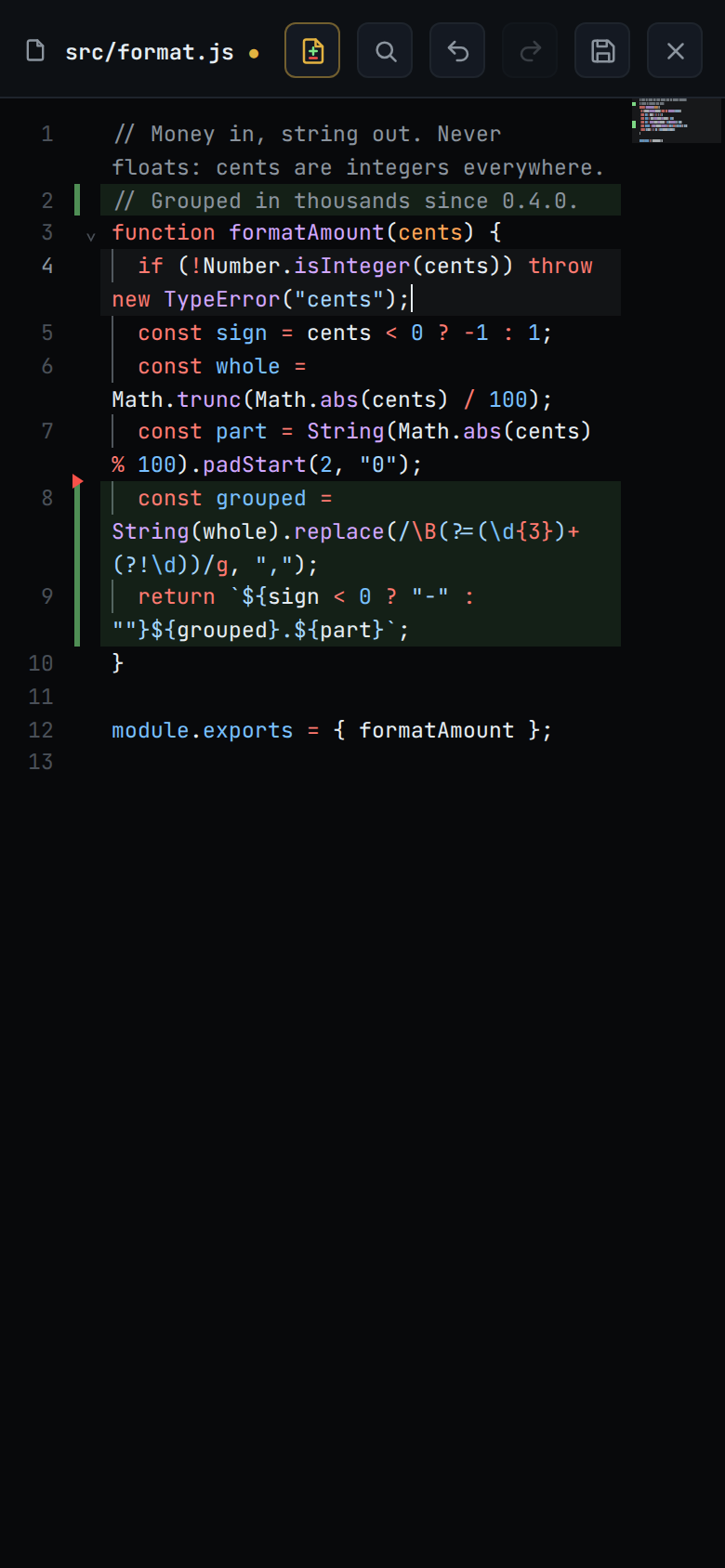
Open the folder a tab works in, read any file and edit it. The editor has the language servers for TypeScript, JavaScript, Python, Go and Rust. Every change the agent made is in one diff that scrolls like a pull request. Hold a line in a file and type what is wrong with it, and the comment goes to the agent with the file and the line.
You want to use the computer yourself
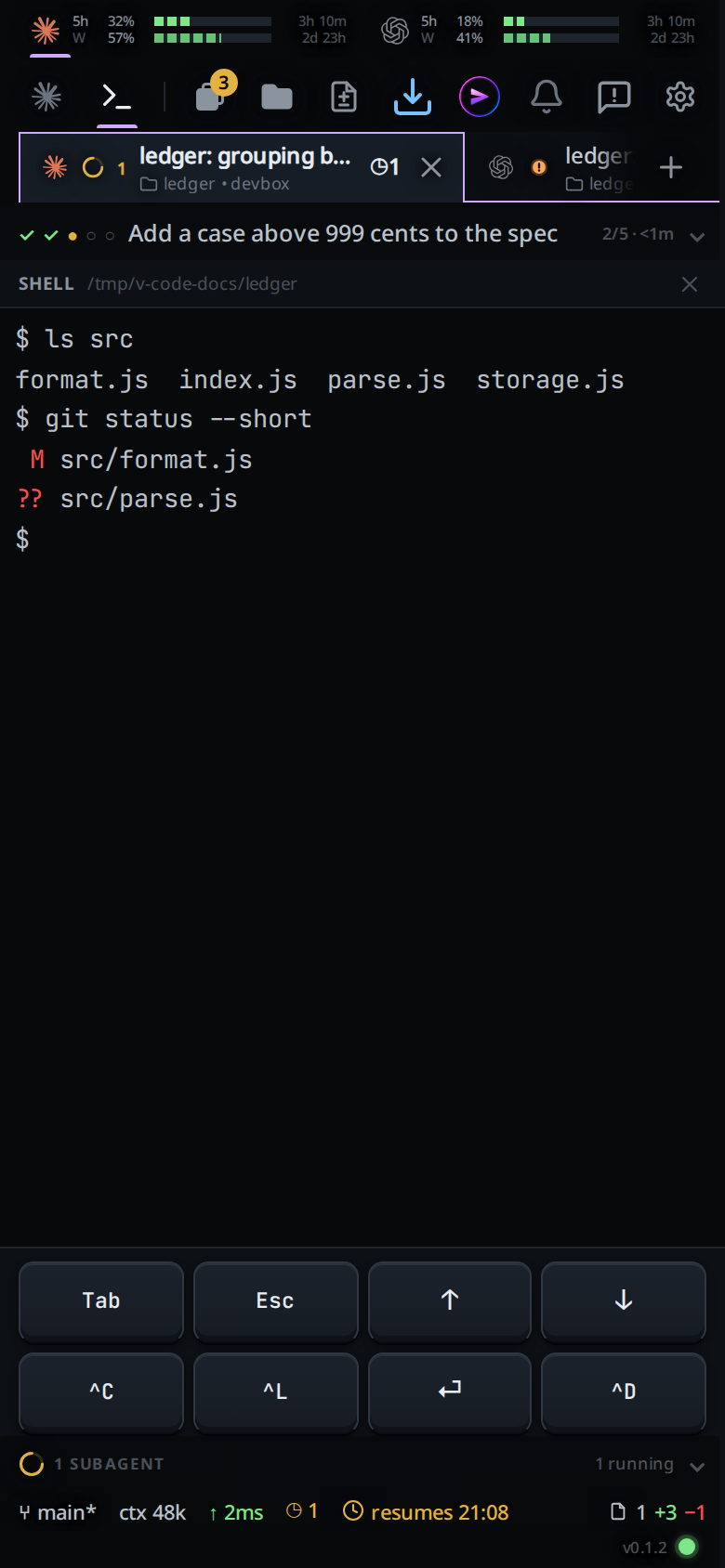
Remote Control lets you talk to Claude. VCode also lets you use the computer: each tab has a real shell on it, in the tab's folder, with keys for Tab, Esc, the arrows and Ctrl+C above the phone's keyboard. Run the tests, check git status, open vim or htop, restart a stuck server, or cd anywhere else on the computer, without asking an agent to do it.
You want to see the web page the agent is building
A dev server running on your computer opens on your phone at a private https address. Only your own devices on your VCode account can open it. You need no tunnel of your own and no second machine on the same network.
You want the agent to run without asking
For each tab you choose from the phone how much the agent may do on its own. At Ask, it edits files in the tab's folder and asks you before it runs a command, goes on the web or touches anything outside the folder. At Auto, the agent's own reviewer decides, and asks you when it will not. At Full, it runs anything without asking, the way Claude Code does with Bypass permissions. Remote Control cannot set that last one from the phone.
When the agent asks, a card shows in the conversation and waits for you to tap Allow or Deny, with no time limit.
You want the transcript off third-party servers
VCode keeps every conversation in files on your computer. Your phone reaches the computer over an encrypted channel through the VCode router, which forwards it and cannot read it. The agents still send your prompts and code to their own vendors, as they do in a terminal.
Set up VCode
You need a Linux PC, a Windows PC or a Mac with at least one agent on it.
- Open a terminal on that computer (PowerShell on Windows, Terminal on a Mac) and run the install command. On Linux or a Mac:
On Windows:curl -fsSL https://fezu.dev/install | shirm https://fezu.dev/install.ps1 | iex - When it finishes, VCode opens. Log in or create an account with your email; we send a code to it. A new account gets a 30-day free trial.
- Scan the QR code VCode shows with your phone's camera. Your phone opens VCode on the same account.
FAQ
Does my computer have to stay on?
Yes, for both. The agents run on your computer. With Remote Control the claude process must keep running too, so close its terminal and the session goes offline. VCode runs in the background on your computer, so closing a terminal does not stop it.
Where is my conversation stored?
With Remote Control, the transcript is stored on Anthropic's servers while the session is connected. With VCode it stays on your computer: the VCode router forwards an encrypted channel and cannot read it. Either way the agent itself still sends your prompts and code to its own vendor, as it does in a terminal.
Do I need Remote Control turned on to use VCode?
No. VCode starts and talks to Claude Code itself. You can keep using Remote Control for other sessions.
- Run the install command in a terminal on your computer.
- VCode opens. Log in or create an account with your email. A new account gets a 30-day free trial.
- Scan the QR code with your phone to open VCode there too.
More guides are on the guides page.