
Update the agents automatically
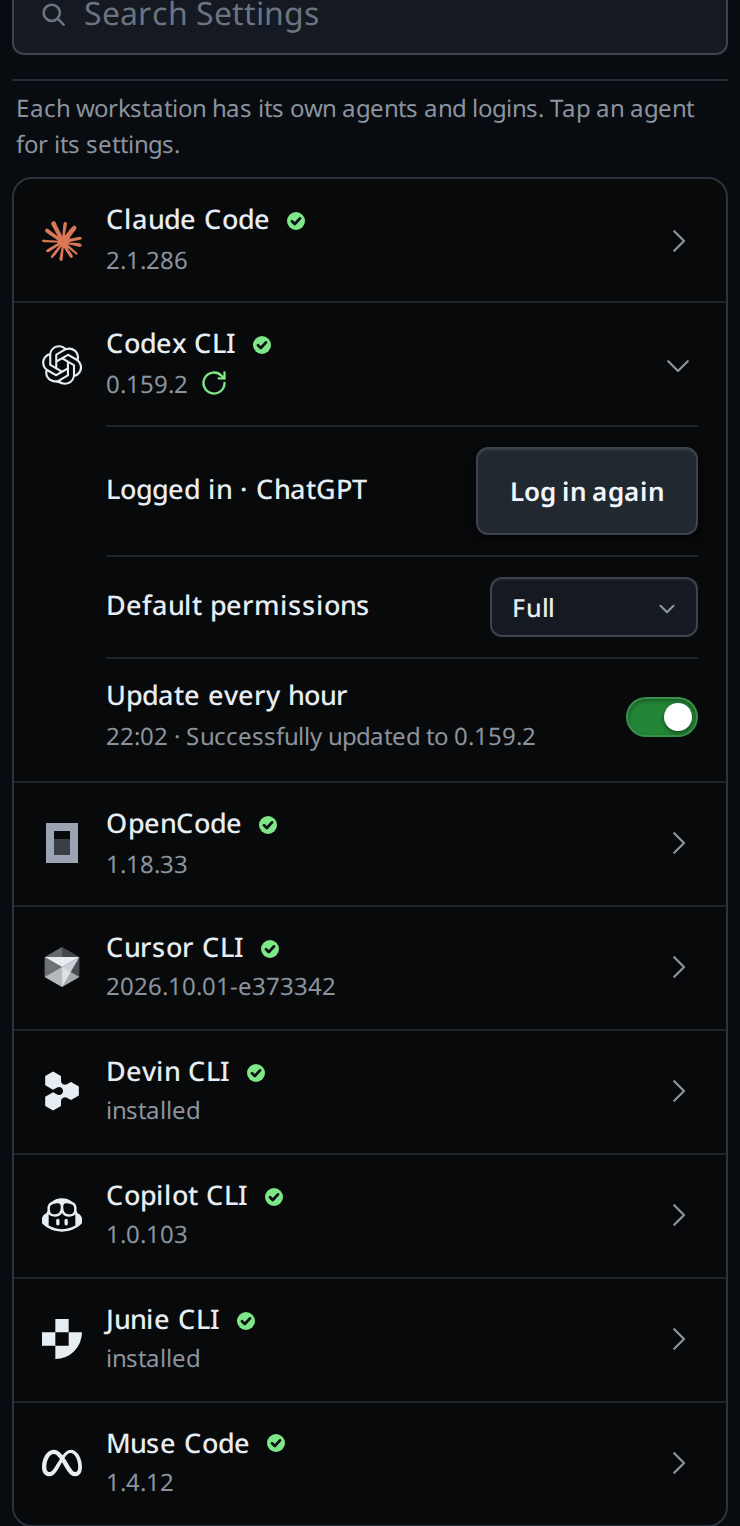
Turn on a switch per agent, and VCode runs that agent's own update once an hour on that computer. Each computer keeps its own switches. An agent you install from the Agents card has its switch turned on when the install finishes.
Why you would use it
You want the newest Claude Code, Codex, opencode, Cursor, Devin, Copilot or Muse CLI on every computer
without typing /update on each one.
How to use it
- Tap the cog (
#settings-open). - In Agents (
#settings-agents), tap the agent's row. With several computers in the app, pick the computer first with the pick at the right of the title (#agents-box). - Turn on Update every hour (
#agent-update-<agent>, for example#agent-update-codex). - The update runs at once, then once an hour. The version under the agent's name changes once the new one is installed. A green update mark sits beside the version while the switch is on, so the closed row shows it too.
What you see
Beside the version on the agent's row, while the switch is on:
- a green update mark (
Updates every hour); - the same mark turning while the update runs (
Updating…); - a red mark when the last update failed (
The last update failed).
Under Update every hour, the agent's last update:
- the time it ran and the last line the CLI printed, for example
15:04 · Successfully updated to 0.159.2, or the date too when it was not today; Failed 15:04 ·and the CLI's last line, when its update failed;Not installed, when the CLI is not on that computer;Updating…while it runs. The sheet checks again every 5 seconds while it is open;Not run yet, when the switch is on and no update has run.
Devin's devin update needs a terminal to report, so VCode reads Devin's
version instead: Updated to devin <version> when it changed, or
devin <version> is the latest when it matches Devin's newest release.
An agent that is not installed has no switch: its row offers Install instead. A computer on a VCode too old for the setting shows no switch.
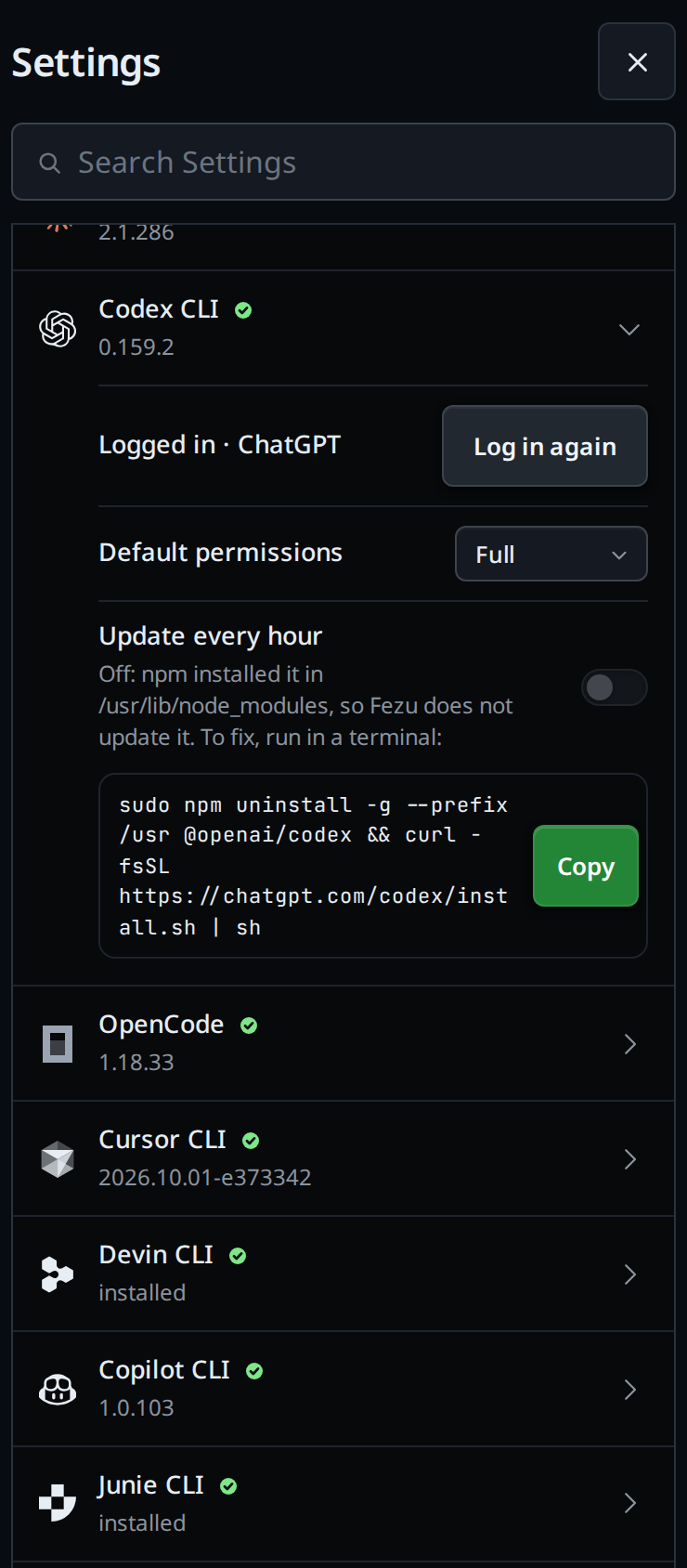
An agent installed with npm
VCode does not update an agent that npm installed, for example with
sudo npm install -g @openai/codex. Its update runs npm install -g again, which
fails where npm's folder needs root and otherwise puts the new copy in whichever
Node comes first on that computer. Its switch shows off and greyed, with:
Off: npm installed it in /usr/lib/node_modules, so VCode does not update it. To fix, run in a terminal:(the folder is the one npm used);- the command that removes the npm copy and installs the agent with its own
installer, for example
sudo npm uninstall -g --prefix /usr @openai/codex && curl -fsSL https://chatgpt.com/codex/install.sh | sh.sudois there only when the folder needs root; - Copy (
#agent-update-fix-<agent>), which copies the command.
Run it in a terminal on that computer. Then close and reopen the settings: the switch is back, in the state you left it.
VCode also turns off the agent's own update check in its tabs, which fails the same way: Claude Code and opencode installed with npm start without it. Codex needs nothing, since its update check is only in its terminal app.
Options and settings
| Switch, per agent | Default | What it runs |
|---|---|---|
| Claude | Off; on once installed from the Agents card | claude update |
| Codex | Off; on once installed from the Agents card | codex update |
| opencode | Off; on once installed from the Agents card | opencode upgrade |
| Cursor | Off; on once installed from the Agents card | cursor-agent update |
| Devin | Off; on once installed from the Agents card | devin update |
| Copilot | Off; on once installed from the Agents card | copilot update |
| Muse | Off; on once installed from the Agents card | muse --version with MUSE_SYNC_UPDATE=1, which makes Muse check for a new build and wait |
The switches stay on each computer. Settings sync does not carry them.
Limits and known gaps
- An agent with a tab working waits. VCode checks every 5 minutes and updates it once no tab on that agent is working. On a computer whose tabs on that agent never stop, it never updates.
- One update runs at a time, so a slow one holds the next agent back until it ends. An update stops after 10 minutes.
- An agent process already running keeps its old version until it next starts.
- Each CLI updates the way it was installed. One installed where your account cannot write fails its update, and its note says why. An npm install is not updated at all; see above.
/updatein a tab still runs the npm install's own update.- The hour counts from the last run, which a restart of VCode keeps.
Related
- update-from-a-tab: update the agents, their model lists and VCode now, from one tab
- synced-settings: which settings each computer keeps to itself
- the-three-agents: the agents and their CLIs
- log-in-to-an-agent: the same Agents card logs each agent in
- devin: the Devin tab, and what its
devin updatedoes to it - copilot: the Copilot tab, and what
copilot updatedoes on an npm install - muse: the Muse tab, and the hourly check its launcher makes