
Track steps with the todo CLI
v-code todo is a command on every agent's PATH inside a thread. An agent uses
it to put its steps on the plan strip, start them, and finish them with a note
saying what came of each one. portal todo still works for an agent resumed
from before the rename: bin/portal requires bin/v-code.
Why you would use it
You are watching a long task from a phone. The transcript is too fast to follow; the strip is not. This is how anything the agent does gets onto it, including work that has no vendor plan tool behind it.
How to use it
From inside a VCode thread, before starting the work:
v-code todo add "Read the failing test" "Fix the parser" --detail "src/parse.js" && v-code todo next && npm test -- parse
# t1  Read the failing test
# t2  Fix the parser
# t1  started  Read the failing test
v-code todo next --note "it asserts on the trailing comma" && sed -n 1,80p src/parse.js
# t1  done
# t2  started  Fix the parser
v-code todo list
The agent runs each of these in the same command as the work it marks, not as
a tool call of its own. Every tool call is a round trip to the model: run alone,
the add, start and done calls made a five-question codex task 40% slower.
next needs no id, so the first step starts in the same call as the add. The
last step stays running until the turn ends: a turn that ends with a reply that
does not ask a question closes the last running step when no step is waiting.
Every verb:
| Command | What it does |
|---|---|
v-code todo add <text>... [--detail <text>] |
adds steps, prints their ids |
v-code todo start <id> |
marks a step running |
v-code todo done <id> [--note <text>] |
marks it finished, with an outcome |
v-code todo next [--note <text>] |
finishes the first running step, with an outcome, and starts the first one not started |
v-code todo reset <id> |
puts it back to not started |
v-code todo note <id> <text> |
sets the outcome on its own |
v-code todo edit <id> <text> |
renames a step |
v-code todo remove <id> |
drops a step |
v-code todo set < items.json |
replaces the list from JSON on stdin |
v-code todo list [--json] |
prints the list |
v-code todo clear |
empties the list |
v-code, v-code --help, v-code help and v-code todo --help all print the
usage.
What you see
On the phone, the steps appear on the plan strip immediately.

--detail and --note are the two lines only this CLI writes, and they show in
the step's inspector:
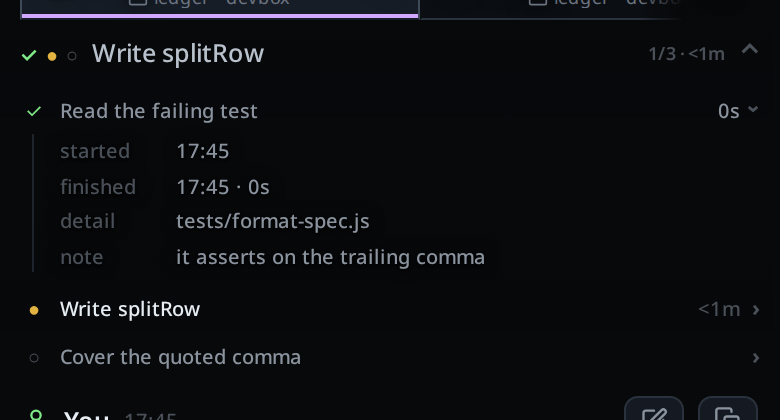
In the terminal, add prints one line per step, <id> <text>, so the next
command can name them. next prints <id> done for the step it finished and
<id> started <text> for the one it started; with nothing to finish or start
it prints nothing and still exits 0, so the command chained after it runs. list prints t1 ✓ Read the failing test 42s, the same
glyph and the same span the strip shows. An empty list prints no steps yet.
Options and settings
| Option | Default | What it changes |
|---|---|---|
VCODE_THREAD |
set by the runner | which thread the steps belong to |
VCODE_API |
set by the runner | the VCode API, e.g. http://127.0.0.1:3445/api |
VCODE_TOKEN |
set by the runner | the token v-code todo signs in with; empty is fine on a box with no token |
--detail <text> |
none | the longer text shown in the step's inspector |
--note <text> |
none | the outcome, shown in the inspector |
The runner sets the same three under their old PORTAL_* names too, for a
resumed session or an older skill.
Limits and known gaps
- Outside a thread it refuses:
v-code: not inside a VCode thread (VCODE_THREAD unset), exit 2. Same forVCODE_API. - A plan holds at most 100 steps; over that the route answers
a plan holds at most 100 steps. - A step's text is at most 200 characters, and
detailandnoteat most 2000. Empty text is refused witha step needs text. - Control characters in a step's text collapse to a space, so a step cannot
forge a second row or repaint the terminal of whoever reads the list.
detailandnotekeep line breaks and tabs and lose the rest. - Ids must be in the shape the fold mints (
t1,t2, …).setrefuses anything else. note <id>with no text is refused rather than silently clearing the note.v-code todo note t1 ''is the deliberate way to take one off.- A server refusal is printed with its status and reason, exit 1. Unreachable
server:
cannot reach VCode at <url>, exit 1.
Related
- Collect Jev model selection evaluations: record task difficulty and model recommendations in the shadow pilot
- plan-strip: what the user sees
- subagents-strip: the other progress strip
- what-the-agent-is-told: where
VCODE_THREADand the rest come from - trust-model-and-security-headers: the bearer token
VCODE_TOKENcarries - environment-variables: VCode's own settings