
What VCode tells every agent
Every agent started in a tab gets the same short instruction block and the same four environment variables. That is what makes the plan strip fill itself, what lets an agent put a screenshot in the transcript, and what puts a proof under the reply of a turn that changed code.
Why you would use it
It explains behaviour you will otherwise find odd: why the agent keeps a todo list
you did not ask for, why it sometimes posts images inline, why a reply carries a
Proof section, and why v-code is a
command that exists inside a thread and nowhere else.
How to use it
From your seat, nothing. From an agent's seat, inside a thread:
v-code todoadd "<step>" "<step>"before starting, thenv-code todo nextto start the first step.v-code todo next --note "<outcome>"when a step finishes: it closes the running step and starts the next one, with no ids to look up.- The last step stays running. When the agent's final reply ends the turn,
VCode closes it. None of these gets a tool call of its own, since every call
is one more round trip to the model: the list goes in with the first piece of
work (
v-code todo add "Find it" "Fix it" && v-code todo next && rg -n login src), and eachnextwith the work that follows it. - To show an image: copy it to
~/.v-code-shots/and write a markdown image line for it on its own line. Something that moves for under about 10 seconds goes out as a GIF the same way. A longer recording, or one with sound, goes as an MP4 (H.264, AAC) in~/.v-code-shots/with the same line, which you tap to play. - To show you a web page: serve it
on
127.0.0.1on this computer (your dev server, orpython3 -m http.server <port> --bind 127.0.0.1in the folder of a static HTML file) and runv-code preview <port>, with--path /<page>for a page under it. The agent must lead its reply with the Markdown preview link the command prints, copied unchanged. Each tap gets fresh preview access.v-code previewprints the process serving the port; when that is not the agent's own server, the port was taken, and the agent serves on a free port instead. It never tells you to openlocalhost:<port>, which on a phone is the phone. It leaves that server running, says in its reply what serves the page and how to stop it, andv-code preview --close <port>closes it. - Before the final reply of a turn that changed code:
v-code proof --base <branch it started from>in the repository or worktree that holds the work, before merging it, with--shot <png>for each screenshot of a visible change and--check "<command>: <result>"for each check it ran (proof-of-done). The result leads with the final run's counts or one word (pass 412, fail 0,ok), and a test-first run puts the red run after it with "before":pass 12, fail 0 (5 failed before the fix). - After it opens a pull request or pushes to one:
v-code watch pr <url>, so VCode wakes it on a failed check, a conflict or a change request. It keeps the watch when its turn ends, and runsv-code watch stoponly when the pull request no longer needs it (watch-pull-request). - Before the final reply: stop every background shell, wait loop and server it started that still runs, unless you asked for it to keep running. A tab with one still running wears the background shell mark.
- When you ask it to open, split, show or drive tabs, projects or settings:
v-code tab,v-code view,v-code projectandv-code settings(agent-commands). A tab it opens stays in its own project unless you name another place. Work on another folder goes to that folder's project, found withv-code project list, and to Worktop only when no project holds the folder. - When you ask how VCode works or what it can do: read the docs at https://fezu.dev/docs.
What you see
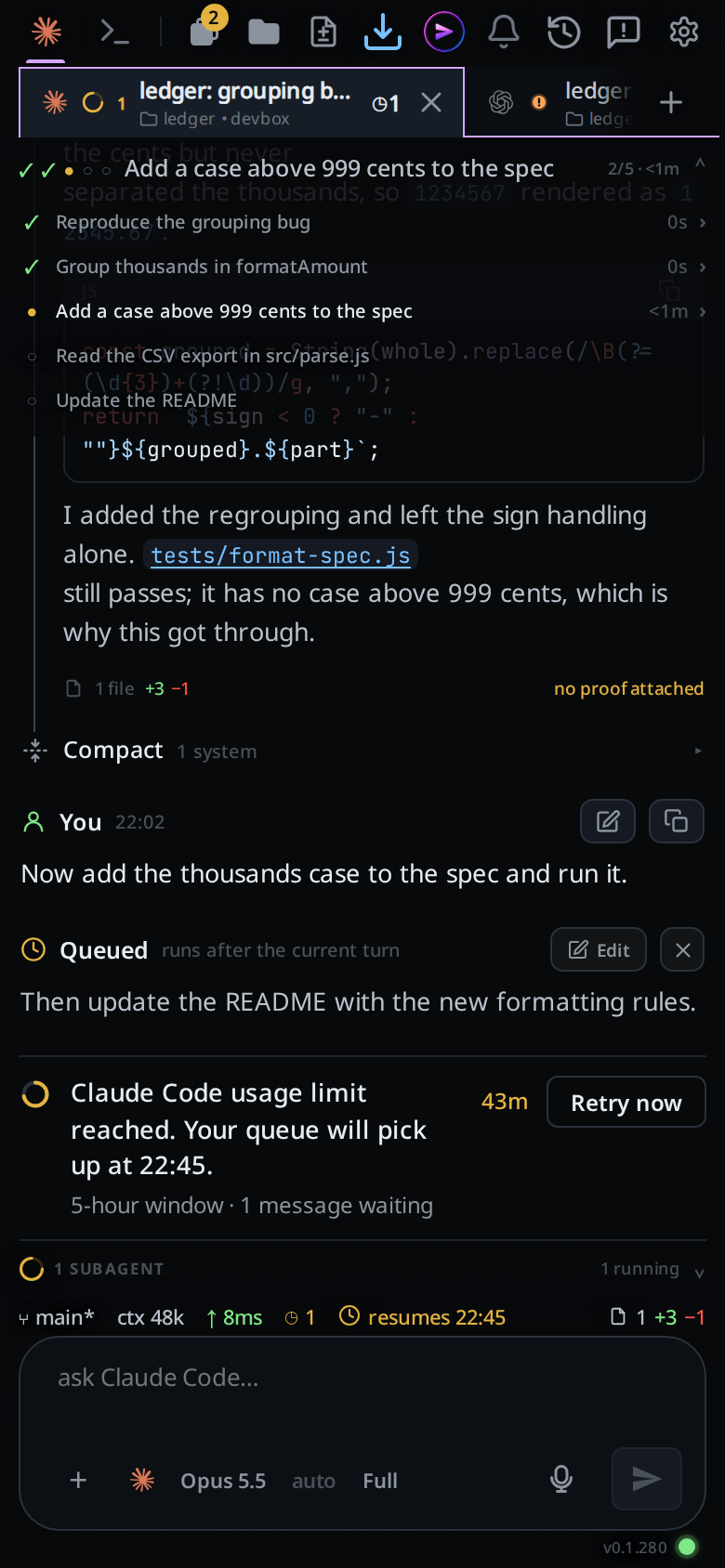
The plan strip above the transcript fills as the agent works, with an outcome note on each finished step. Images the agent posts render inline in the transcript. A turn that changed code ends with a Proof section under its reply.
Options and settings
| Variable | Value | What it is for |
|---|---|---|
VCODE_THREAD |
this thread's id | Tells v-code which thread it is in |
VCODE_API |
http://127.0.0.1:<port>/api |
Where v-code posts |
VCODE_TOKEN |
the auth token, or empty | Always set; empty means auth is off, absent means not inside a thread |
PATH |
prefixed with the repo's bin/ |
Makes v-code a command the agent can type |
The three VCODE_* values are set a second time under their names from before
the rename, PORTAL_THREAD, PORTAL_API and PORTAL_TOKEN, which a resumed
session or an older skill still reads.
The instruction block itself, sent to claude as --append-system-prompt, to
codex as developerInstructions on thread/start, to opencode as an
instructions file and to Devin, Copilot and Muse inside a <vcode-system> block at the top of the
first message of a new session, says: VCode shows a todo list
above the transcript; inside a VCode thread use the v-code todo CLI for any
task with more than one step; TodoWrite and TaskCreate feed the same list but
cannot carry an outcome, so prefer the CLI; how to post an image (copy it to
~/.v-code-shots/, see the v-code-screenshots skill); to send a screen
recording or animation under about 10 seconds as a GIF under about 5 MB, and a
longer one or one with sound as an MP4 made with
ffmpeg -i in.mov -c:v libx264 -crf 28 -preset veryfast -vf scale=-2:720 -movflags +faststart -c:a aac out.mp4,
shown with the same line; to show a web
page by serving it on 127.0.0.1 and running v-code preview <port> (with
--path for a page under it), never by naming a localhost address, and to
leave that server running and say how to stop it; to prove a turn that
changed code before its final reply by running v-code proof --base <branch>
where the work is, before merging it, with --shot for a visible change and
--check per check run, each result led by the final run's counts or one word
and a test-first run's red run after it with "before", to run it again when it
prints that it read a check wrong, and not to paste the diff into the reply; "After you
open a pull request or push to one, run v-code watch pr <url>: VCode wakes
you when a check fails, the branch conflicts or a review asks for changes, so
do not poll CI yourself; keep the watch when your turn ends, and run
v-code watch stop only when the pull request no longer needs you."; to stop
the background shells, wait loops and servers it started before its final
reply, unless you asked for one to keep running, and not to wait on
pgrep -f "<pattern>", which matches its own command line; to use
v-code tab and v-code view when you ask it to open, split, show or drive
tabs; to read the docs at https://fezu.dev/docs when you ask how VCode
works or what it can do; and to use Agent
subagents for three or more genuinely independent tasks, or a workflow that needs
independent reviewers, but not to delegate simple or serial work just to
populate the interface.
With Work on set to Worktree, a paragraph follows the
block: make each code change in a git worktree under worktrees/, add
worktrees/ to .gitignore when the repository does not ignore it, and remove
the worktree and its branch once merged.
Your own system prompt, when you have written one, comes after these, separated by a blank line, in the same flag, field or file. The block itself never changes: your text adds to it and cannot replace it.
In a tab of a project with two or more folders, a
last part follows: the project's name, every folder's full path with the one
the agent started in marked (you started here), and a line saying it can work
in any of them by full path. It is read from the project each time the agent
starts, so a folder you add in Edit project reaches a running tab the next time
its agent starts.
Limits and known gaps
- One string, one file, for all three vendors. If the texts drifted, one vendor would quietly be working off the old instructions.
- Cursor is given no VCode prompt, and so is not told a project's folders either.
- Devin, Copilot and Muse get the block once per session, in their first message. Later messages do not carry it.
- opencode adds the prompt to the instructions of its own config files; it does not replace them.
codexgetsdeveloperInstructions, notbaseInstructions; the latter would replace codex's own prompt outright.- The environment is a copy of the server's.
VCODE_THREADis never written into the server's own environment, or the first thread's id would end up on every agent spawned after it. PATHis prefixed, not appended, so thebin/an agent finds is the one belonging to the server it is talking to.- A bind address is not a URL: a wildcard bind is dialled on loopback, and an IPv6
address is bracketed, so
v-codecan always parse the origin.
Related
- the-three-agents: which agents receive the prompt
- projects: the folders an agent in a project is told about
- system-prompt: your own instructions, added after this block
- work-in-worktrees: the worktree paragraph Work on adds
- background-and-resumed-subagents: what the prompt asks for with subagents
- todo-list: the CLI the prompt tells the agent to use
- plan-strip: where the steps land
- agent-commands: the commands an agent drives the app with
- agent-commander: the one assistant that gets its own lines after this prompt
- tab-status: how a tab shows the agent is waiting on you
- inline-screenshots: the image path the prompt describes
- tab-memory-cap: the line on the tab's memory cap, where
/tmpis tmpfs - proof-of-done: what
v-code proofputs under the reply - web-preview: the preview tab
v-code previewopens - watch-pull-request: what
v-code watch prstarts - devin: Devin's first message and the instruction block
- copilot: Copilot's first message and the instruction block
- muse: Muse's first message and the instruction block