
Watch a pull request and wake the agent
VCode keeps an eye on a pull request for a tab. When a check fails, the branch starts to conflict, or a reviewer asks for changes, VCode sends that to the tab's agent as a message. The agent fixes it and pushes, and your phone gets a notification.
Why you would use it
The agent opened a pull request and finished its turn. CI runs for ten minutes after that, and a reviewer may come back an hour later. You do not want to sit and check. With a watch, the agent hears about each failure and gets back to work by itself.
How to use it
In a tab, type
/watchand the pull request's link or number in the message box (#draft), then send:/watch https://github.com/owner/repo/pull/12, or/watch 12for a pull request in the tab's own repository. A toast readswatching PR #12 "<title>".The agent can start one too. VCode tells every agent to run
v-code watch pr <link or number>after it opens or pushes to a pull request, so a tab that opens one usually watches it without you asking.Look at the status bar (
#statusbar): each watched pull request is a segment,⟳ PR #12with a mark for how its checks stand.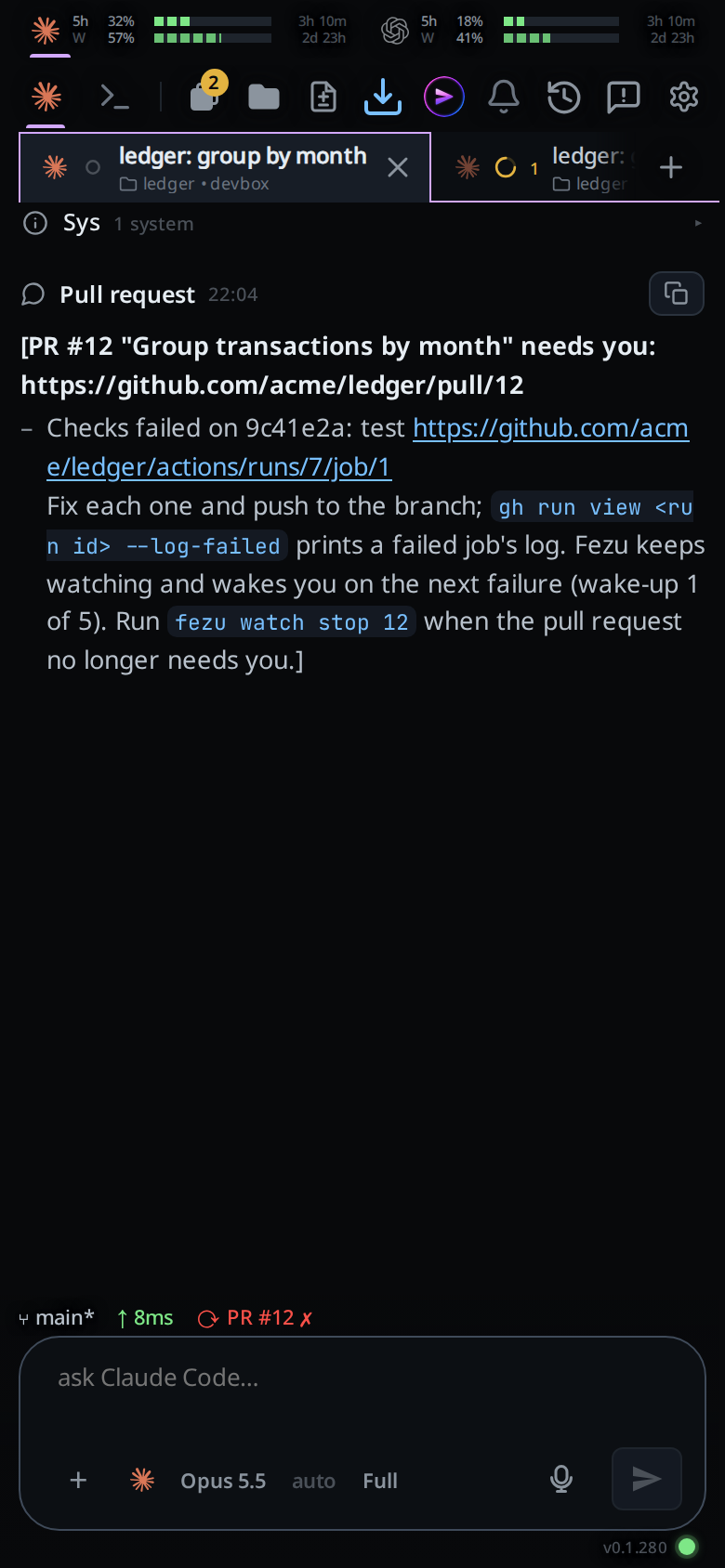
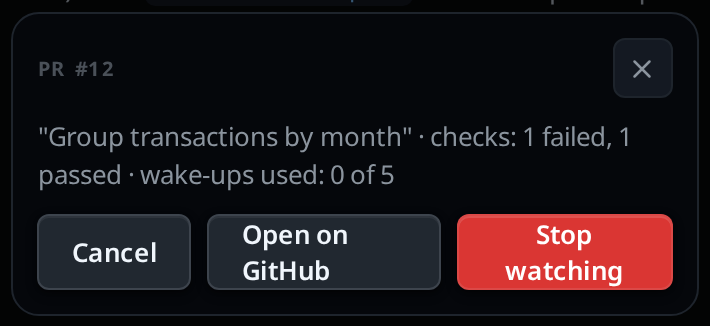
Tap the segment. A popup shows the title, the checks, a conflict if there is one, and how many wake-ups are used. Open on GitHub opens the pull request; Stop watching ends the watch.
Type
/watchon its own to list the tab's watches in a toast,/unwatch 12to stop one, or/unwatchon its own to stop every watch of the tab.
What you see
The segment, one per watched pull request:
| Segment | Means |
|---|---|
⟳ PR #12 ✗ (red) |
A check failed, or the branch conflicts with its base |
⟳ PR #12 … (amber) |
Checks are still running |
⟳ PR #12 ✓ (green) |
Every check passed |
⟳ PR #12 (amber) |
No checks yet |
The transcript gets a row when a watch starts, Watching PR #12 "<title>", and
one when it ends, Stopped watching PR #12: <why>. The why is merged,
closed, stopped, 5 wake-ups used, or the words below about gh.
A wake-up is a row headed Pull request, with its first line in bold. VCode wrote it, not you, so it has no edit button. It lists what changed:
[PR #12 "Fix the build" needs you: https://github.com/owner/repo/pull/12
- Checks failed on abc1234: test https://…/job/1, lint https://…/job/2
- The branch conflicts with master.
- alice asked for changes: "first 200 characters of the review"
Fix each one and push to the branch; …]
If the agent is in the middle of a turn, the wake-up waits in the queue. If the tab is idle, it starts a turn.
With notifications on,
your phone gets one titled <tab title> · PR #12 for each failure, conflict
and change request, once when every check on a new commit passes
(checks passed), and when the watch ends (merged, closed,
stopped watching: 5 wake-ups used, or the gh words).
/watch and /unwatch toast what the computer answers. The refusals are:
gh is not installed on this box. Install it from https://cli.github.com, run gh auth login, then watch again.gh is not logged in on this box. Run gh auth login in a terminal on it, then watch again.PR #12 is merged; there is nothing to watch.(orclosed)VCode stopped watching PR #12 after 5 wake-ups. Only the user can watch it again, with /watch 12 in the tab.a tab watches at most 5 pull requestsgh pr view failed:and the last line gh printedThe tab's folder <path> is gone. Name the pull request by its URL.when you give a number and the tab's folder no longer existspr must be a pull request URL, a number, #N or owner/repo#N
Options and settings
| Option | Default | What it changes |
|---|---|---|
/watch <link or number> |
none | Watches that pull request in this tab. A number, #12 or owner/repo#12 work too |
/watch |
none | Lists the tab's watches |
/unwatch <number> |
none | Stops that watch |
/unwatch |
none | Stops every watch of the tab |
v-code watch pr <link or number> |
none | The agent's way to start one; prints what it sees now |
v-code watch stop [<number>] |
none | The agent's way to stop one, or all |
v-code watch list [--json] |
none | The tab's watches |
Limits and known gaps
- It needs the
ghcommand on the computer the tab runs on, logged in as you. VCode adds no GitHub login of its own. - VCode reads each watched pull request every 2 minutes, so a failure can take that long to reach the agent.
- A watch wakes the agent at most 5 times. The fifth message says it is the
last; then the watch stops and your phone is told. After that only you can
watch that pull request again, with
/watch; the agent cannot. - Each push a watch sends also goes into the Agent Commander's feed, so you can ask it what your pull requests did.
- A tab watches at most 5 pull requests.
- An agent that runs
v-code watch pragain on a pull request the tab already watches changes nothing: the wake-ups used stay as they are. An agent that stops a watch and starts it again goes on from the wake-ups it had used and from what it had been told, so the same failure does not wake it twice./watchfrom you starts that watch over at 0 of 5. - A failed check waits until the other checks finish, or 10 minutes from when it was first seen, so the agent gets one message with every failure rather than one per check.
- Each failed check wakes the agent once per commit. A check someone reruns that fails again wakes it again, and so does a failure on a new commit.
- A closed tab is not checked. Reopen it and its watches carry on.
- The watch stops if gh goes missing or logs out, and after 5 failed reads in a row.
Related
- agent-commander: each push a watch sends is a line in the Commander's feed
- status-bar: the other segments beside the watch
- thread-finished-notification: the notifications a turn sends; a watch sends its own
- agent-commands: the other
v-codecommands an agent runs - what-the-agent-is-told: where the agent learns to start a watch
- slash-menu: where
/watchand/unwatchare listed