
Run your tabs with the Agent Commander
The Agent Commander is one assistant for your whole account. You open it from the VCode icon in the top bar, in a popup over the tab you are on, and tell it what you want done. It starts tabs for the work, sends them words, waits for them and reads their replies. It does nothing until you talk to it.
Every VCode account has the Agent Commander, the 30-day trial included. Until
the app has heard your account from fezu.dev you do not see it: no VCode icon
in the top bar, no /commander, and no Agent Commander group in the cog.
Why you would use it
You are on your phone with three tabs running and a fourth task in mind. Instead of finding the right project, picking an agent and typing a prompt, you tell the Commander "have a tab fix the pricing typo" or "what is the codex tab stuck on?", and it does the rounds for you.
How to use it
Tap the VCode icon in the top bar (
#conductor): on a phone it sits next to the bell, on a wide window at the top left, before the usage meters. The Commander opens in a popup that drops from the icon (#commander-pop). The tab you were on stays under it, and the icon stays pressed while the popup is up.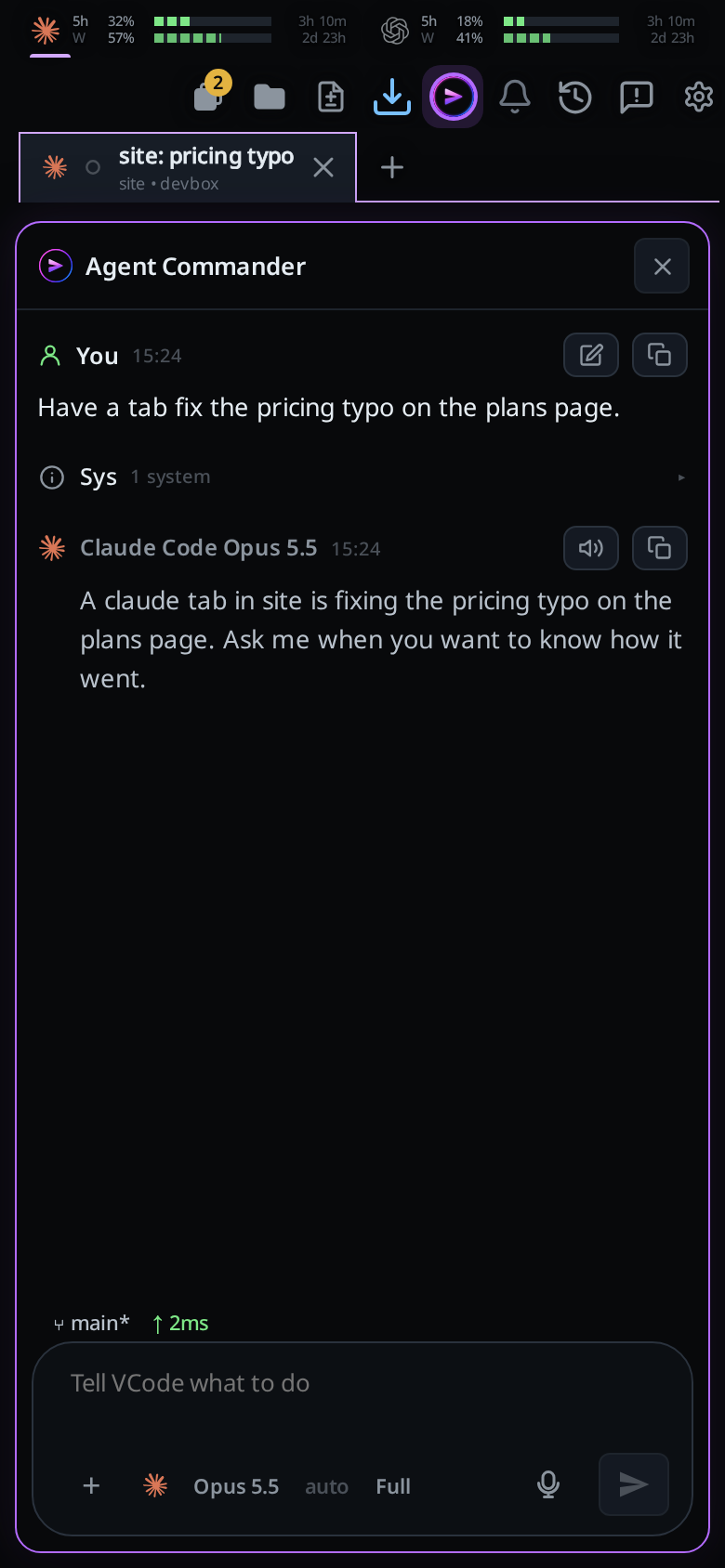
Type or dictate what you want into the box, which reads
Tell VCode what to do, and send it. The Commander starts a tab for each piece of work, with your words as its prompt, and tells you what it did. Each command it runs is a system row in its transcript.The popup is a whole tab: its transcript, its plan and subagent rows, the message box with attachments, the slash menu, the model and effort picks, Stop and approval cards all work in it as they do in any tab.
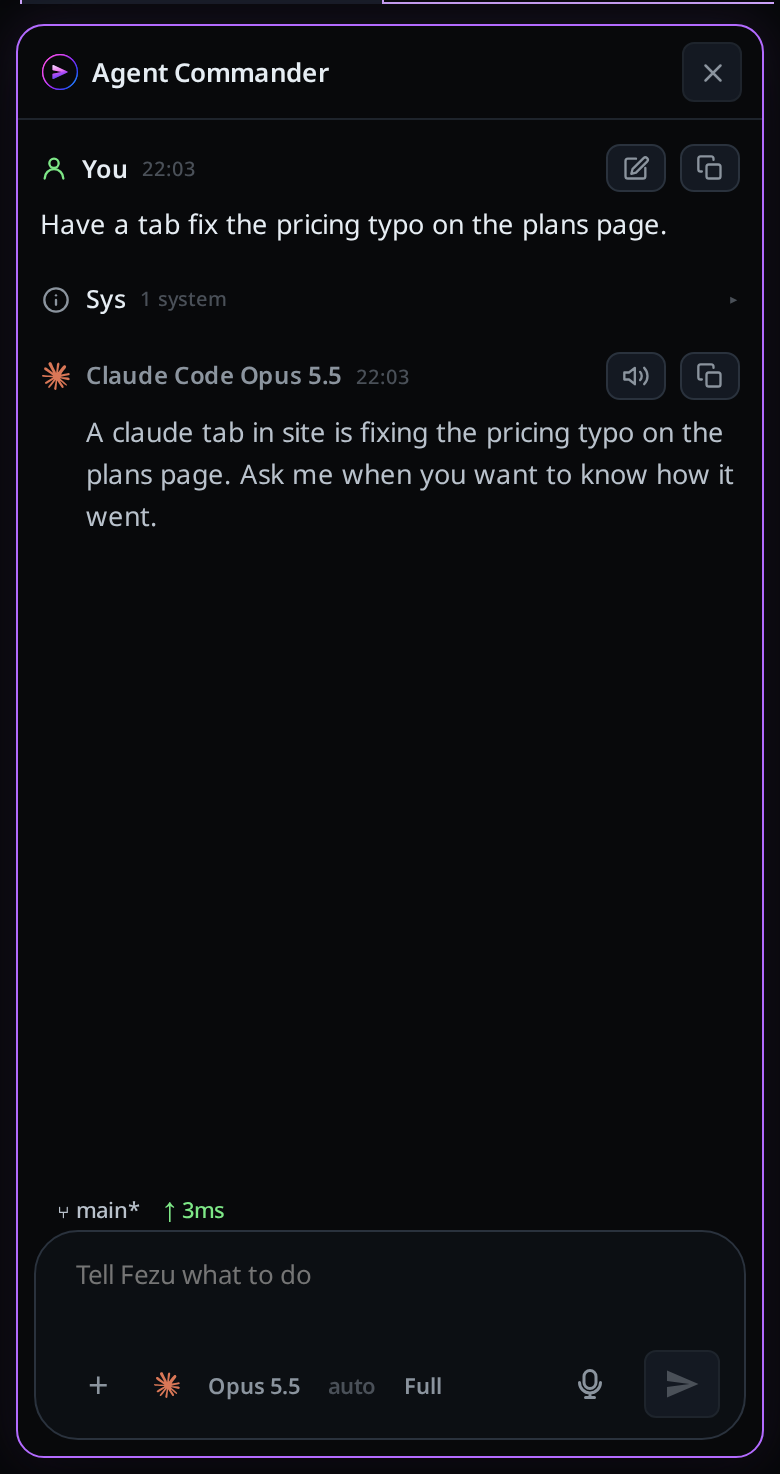
Tap the icon again, or the popup's close (
#commander-close), to go back to the tab under it, or to the project's empty page. Escape, the phone's back and Ctrl+W close it too, and so does a tap on a tab in the strip or on another pane on a wide screen. While the Commander is working, the first Escape stops its turn and the next one closes the popup. On a phone the popup opens below the strip, so the project's tabs stay in reach. PageUp and PageDown scroll the popup's transcript while it is up. If you close the tab under the popup, the tab beside it takes its place, the same one a close picks with no popup, and closing the popup lands there. A notification from the Commander opens the popup over the tab you are on, as the icon does./commander(or/vcode) in the message box opens the same Commander, whichever tab or project is in front.Close it like any tab. The icon opens the same conversation again. Type
/clearin it for a fresh one.
An agent in another tab can open the Commander too: v-code tab commander
brings it into view. See agent-commands.
What you see
There is one Commander for the account. It runs on the computer the cog's Workstation setting names, in VCode's own folder there. No project has a Commander of its own.
It keeps its conversation across restarts and updates. If an older version left you more than one Commander, VCode keeps the one you used last.
When the Commander finishes a turn you have not opened, the icon carries a tab's green tick on its corner. When it asks you something, it carries the orange
!. Opening the Commander clears the tick; your next message clears the!. The Tabs button's badge does not count the Commander.
It is in no strip, pane strip or tab bar, and no swipe lands on it. The icon,
/commanderandv-code tab commanderare the only ways in. On a wide screen the popup hangs from the icon at the right, left of the files column, and your panes keep their tabs under it.The popup has no shell. The agent and shell switch hides while it is up, and a
!line in its box still runs a command.It keeps the title
Agent Commander. Your first message does not rename it.Your messages show as you typed them. VCode puts a screen line in front of each one, and the transcript leaves it out. It names what the popup stands over: the computer and the tab under it on a phone, the tabs your panes show on a wide screen, and the project in front:
[screen: box devbox (<box id>) · tab 7f3a1111 "Fix login redirect" · project site] [screen: box devbox (<box id>) · panes 7f3a1111 "Fix login redirect" · project site]A message that starts with
/goes without the screen line, so/compactand your skills run as they do in any tab.It acts only on what you ask. No tab reports to it, and it starts no turn by itself.
It sees every project and tab on its computer. For live state it runs
v-code tab list,v-code tab read <tab> --last Nandv-code project list.It can look back. The computer writes one line to a feed for every notification its tabs raise: a turn done, a tab that needs you, a failed turn, a turn a restart stopped, news on a watched pull request. The Commander reads the feed only when your question needs it, say "what finished while I was out?". A line reads:
2026-10-10 14:03Z · tab 7f3a1c2d "Fix login" · project site · done: Pushed the fix; tests pass.The Commander starts tabs with
v-code tab new --prompt "<the task>", passing the project the work belongs to, or a folder. A tab with neither opens in Worktop. The new tab appears in its project's strip; the screen stays on the Commander. It runsv-code view show <tab>when it wants you to look at one. It sends a tab words withtab sendand waits for it withtab wait. Those commands on tabs of its own computer run there, so it keeps working with your phone locked.In the tab, what the Commander sent is labelled
Agent Commanderbeside VCode's mark, notYou. Tap the name to open the Commander. A message from any other tab carries that tab's title and its agent's logo.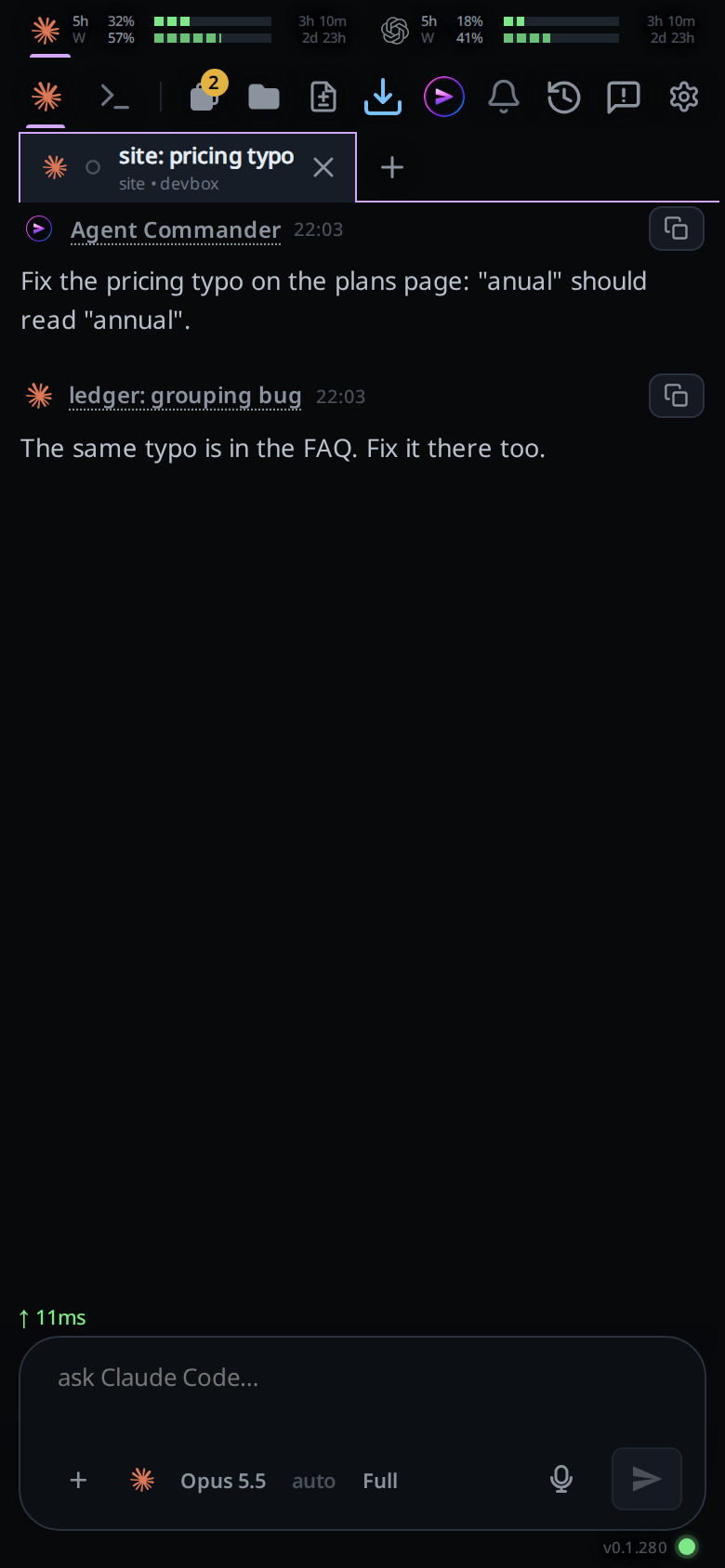
It never resumes, re-prompts or sends words to a tab you or an agent stopped unless you ask it to.
It answers a tab's approval with
tab approve <tab>(--denyto refuse), only when you tell it to or when it runs at Full. At Full it decides the tab's card at once. Below Full the card comes to the Commander's own tab instead, titledtab approvewith the tab's name, the tool and the command under it: your Approve or Deny there decides the tab's card. Stop on the Commander removes that card without deciding the tab's; deciding the tab's card in its own tab removes the Commander's. For a tab on the Commander's own computer the computer does this itself, with no app open; a tab on another computer needs the app open. A tab that opened another tab withtab newcan approve that tab's cards the same way (agent-commands).It runs at your default permission level for its agent, like a new tab. At Ask its approval cards show in its own tab, and a card or a finished turn sends a notification like any tab's.
A new project opens on its own empty page, not on a Commander.
Toasts:
no workstation to run the Agent Commanderwhen the computer that runs it is not online;Update the workstation for the Agent Commanderwhen that computer is on a release from before the Commander.
Options and settings
The cog's Agent Commander group (#settings-conductor) is saved to your
account, so every phone and computer you use has the same picks. Agent, model
and effort apply to a Commander made after the change; one already made keeps
its own. Change those in its tab, as in any tab.
| Option | Default | What it changes |
|---|---|---|
Workstation (#conductor-box) |
The first computer you linked | The computer the Commander runs on |
Agent (#conductor-agent) |
Claude | The agent a new Commander starts on. Picking one sets model and effort back to auto |
Model (#conductor-model) |
auto | The model a new Commander starts on |
Effort (#conductor-effort) |
auto | The effort a new Commander starts on |
Limits and known gaps
- It needs a VCode account. On a workstation not linked to one,
/commanderanswersthe Agent Commander needs a VCode account., and an agent'stab commander, andtab approvefrom a Commander, fail withThe Agent Commander needs a VCode account.A tab approving a tab it opened is not a Commander feature, and works on every account. A Commander made while the account had it stays on the computer, hidden; it comes back if the account's tier does. No feed lines are written meanwhile. - A phone that has not heard your account's tier yet hides the Commander until fezu.dev answers.
- The feed covers only tabs on the Commander's own computer. It reads tabs on
other computers with
v-code tab read, and cannot approve them from here. - The feed keeps the newest 500 lines. Each line's text is cut at 180 characters.
- A turn that started before the computer last restarted and then fails writes no line to the feed.
- Cursor is not offered as its agent: its CLI takes no system prompt, so it
could not be told it is a Commander. A setting that still names cursor, or an
agent the computer does not run or has not installed, starts the Commander on
the first installed of Claude Code, Codex and opencode, at its defaults. With
none of them installed, tapping the Commander's icon shows
Install Claude Code, Codex or opencode to use the Agent Commander. - Only an Agent Commander can approve a tab. VCode judges that by the tab the command came from, so an agent that can name the Commander's tab on the computer can approve as it.
- Nothing is read aloud.
- A computer that made a Commander per project closes them when it starts on this release. Their conversations stay on disk; the icon never opens them. Removing the project deletes them.
- A computer on a release from before the Commander answers with the toast
Update the workstation for the Agent Commander. While its old conductor thread is still open, the icon opens that thread instead. - A computer that ran the old conductor keeps that conversation: its open conductor becomes the Commander, at the level it had.
Related
- agent-commands: the
v-codecommands the Commander runs,tab commanderamong them - projects: the projects the Commander starts tabs in
- permission-levels: the level the Commander starts at and its approval cards
- what-the-agent-is-told: the prompt every agent gets before the Commander's own
- stop-a-running-turn: Stop works on the Commander's turn as on any tab's
- agent-or-shell-mode: the switch the popup hides: the Commander has no shell
- shell-mode: the terminal the Commander's popup does not open
- back-button: the layers back closes, the popup among them
- watch-pull-request: each push a pull request watch sends is a line in the feed