
Install an agent from your phone
When a workstation does not have Claude Code, Codex, OpenCode, Cursor, Devin, Copilot or Muse installed, VCode still lists it, with an Install button in the settings sheet's Agents group. One tap runs the vendor's own installer on that workstation and shows its output. When it finishes, the agent's login starts in the same place if it needs one. On a workstation with no agent at all, the New thread card opens on the list of agents to install.
Why you would use it
You set up a new workstation and only installed one agent on it, or you want to try another vendor's CLI. You install it from the phone instead of opening a terminal on that workstation.
How to use it
From the settings sheet
Tap the cog (
#settings-open). In the Agents group (#settings-agents) an agent that is not installed has a row with the notenot installedand a green Install button. In the app, the group's workstation pick (#agents-box) chooses which workstation it runs on.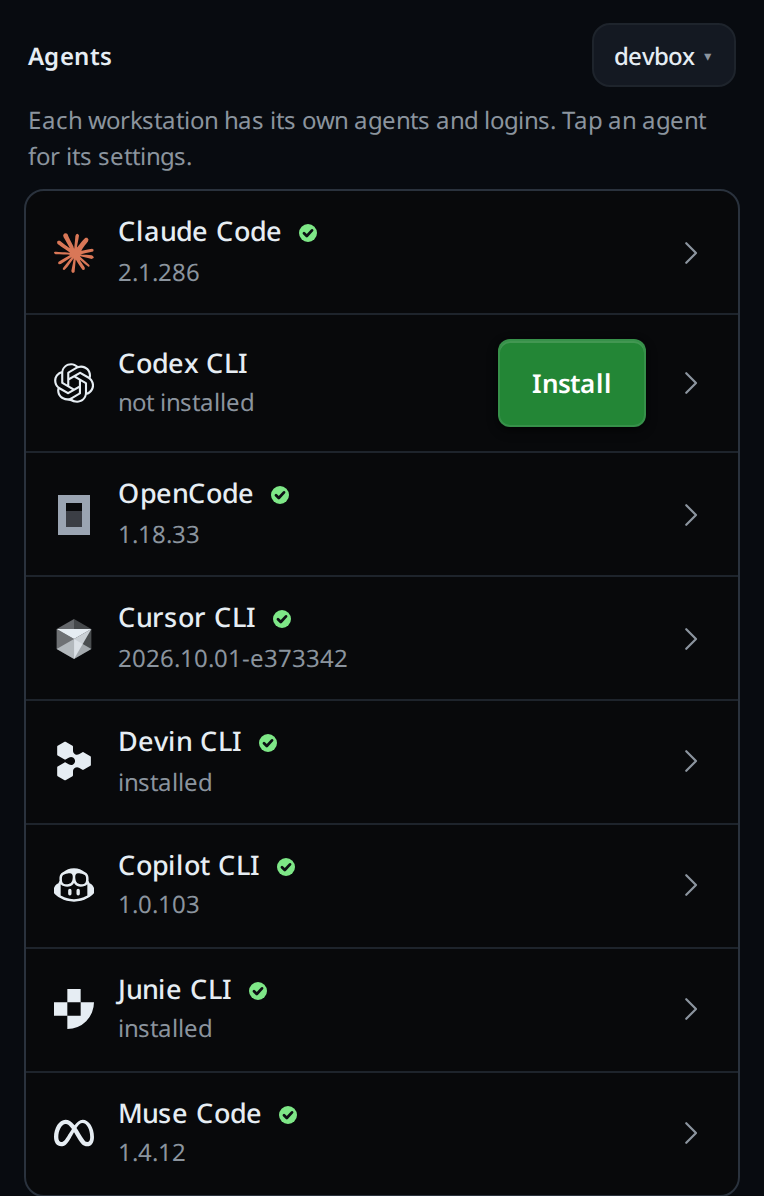
Tap Install. The agent's own screen opens over the settings (
#agent-screen) and readsInstalling Codex on devbox…(this computeron a workstation's own page), with the installer's last lines under it in a small monospace block (.agent-install-lines). It checks again about every second.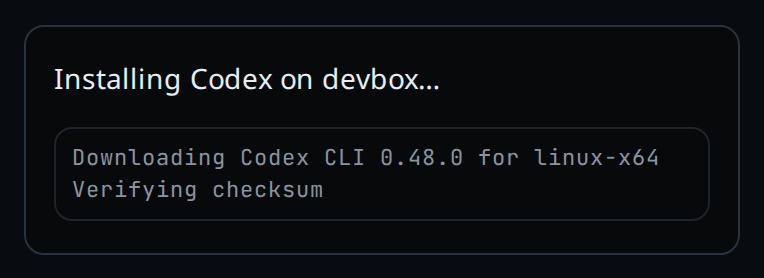
When the install is done:
- If the agent has a login and is logged out (Claude Code, Codex, Cursor, Devin, Copilot, Muse), its login starts on the same screen.
- Otherwise (OpenCode, or an agent already logged in) the screen closes and a
toast says
OpenCode installed. Copilot counts as logged in when the GitHub CLI is, so on such a workstation no login starts.
Cancel (.agent-login-cancel) closes the screen.
When Codex is too old
VCode needs Codex 0.148.0 or newer. An older Codex starts no tab: the tab stops
with codex 0.46.0 is too old for VCode: it needs 0.148.0 or newer. Update it in Settings → Agents → Codex.
In the Agents group its row reads 0.46.0 · needs 0.148.0 with a green
Update button. In the New thread card and the /agent menu it reads
Update Codex. Tap it and Codex's own installer runs, as for an install:
Updating Codex on devbox…, then Codex updated.
The installer puts the new Codex in ~/.local/bin. If the old one comes first
on your PATH, for example from npm or Homebrew, the update fails and names it:
Update failed: update finished but codex 0.46.0 at /opt/homebrew/bin/codex is first on PATH and VCode needs 0.148.0 or newer; remove it, then update again.
For a copy npm installed, the message ends with the npm uninstall -g command
to run instead.
When nothing is installed
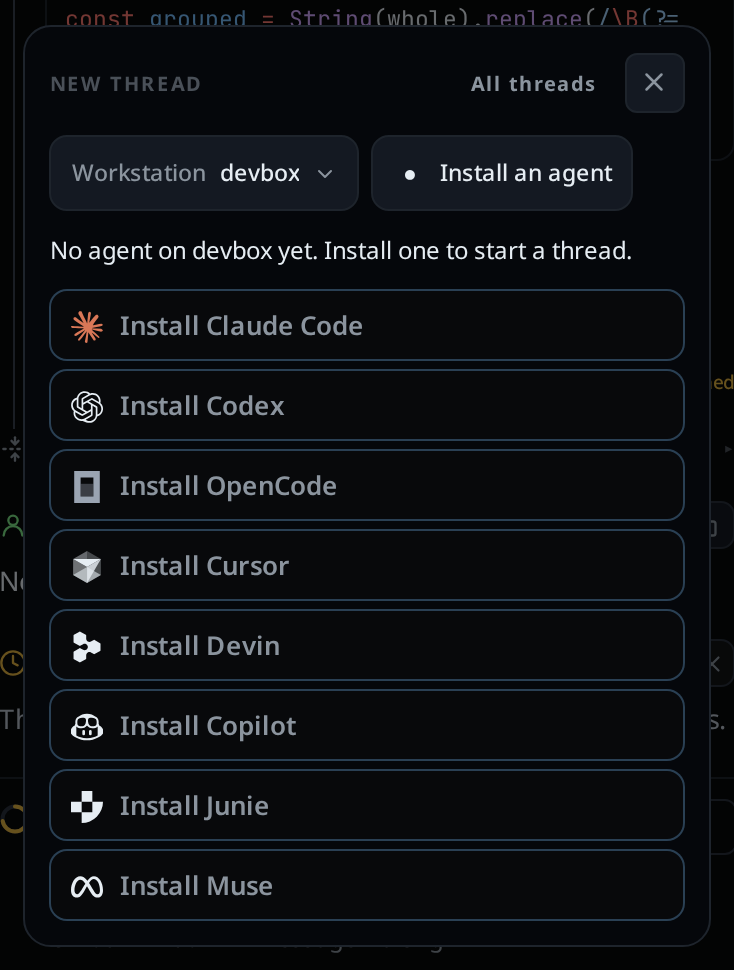
If the workstation has none of the agents installed, the card says
No agent on devbox yet. Install one to start a thread. and opens on the list
of agents to install: Install Claude Code, Install Codex,
Install OpenCode, Install Cursor, Install Devin, Install Copilot and Install Muse. None is marked as the one to pick. There is no folder field and no
Start thread until an agent is in. The agent button (.new-agent) reads
Install an agent; tap it to fold the list, and the card's button then reads
Install an agent and opens it again.
Tap a row and the install runs in the card, as on the settings screen. When the install and any login after it end, the thread starts on that agent in the card's folder, with no tap on Start thread.
With no tab open, the card opens on its own once each time VCode loads, so the first screen on a new workstation is this list.
Your first agent on a trial
On a trial account, a computer with
no tab and no agent installed opens on one card over the whole window, titled
PICK AN AGENT. It says Install an agent on <computer> to start your first thread.
and lists the agents by name: Claude Code, Codex, OpenCode, Cursor, Devin, Copilot and Muse.
- Click an agent. Its install starts in the card, with the installer's output under it, as above.
- Claude Code then asks for its login in the same card.
- Once the agent is in, your first thread starts by itself and the card goes.
The card has no Close button, and Escape or a click outside it does nothing. It has no workstation, agent or folder pick and no Start thread: picking an agent is the only way on.
What you see
| Where | Text |
|---|---|
| Settings row | note not installed, button Install |
| Settings row, Codex too old | note 0.46.0 · needs 0.148.0, button Update |
| Running an update | Updating Codex on devbox… |
| Card on a workstation with no agent | Install Codex |
| Running | Installing Codex on devbox… and the last lines of output, eight at most |
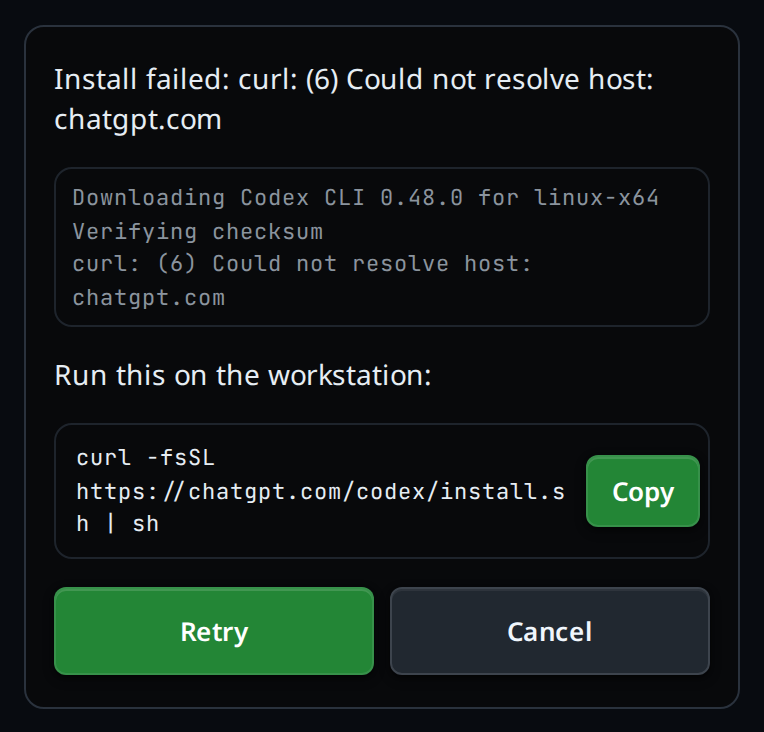
| Failed | Install failed: …, the output, Run this on the workstation:, the command, Copy, then Retry and Cancel |
| Done, no login to do | toast Codex installed |
| Nothing installed | No agent on devbox yet. Install one to start a thread., the list open, Install Claude Code first |
| First agent on a trial | title PICK AN AGENT, Install an agent on devbox to start your first thread., the agents by name |
| Workstation pick in the app | Codex, OpenCode not installed after the login note |
When an install fails, the card shows the command the workstation ran
(.agent-install-command). Copy (.agent-login-copy) copies it, so you
can paste it into a terminal on the workstation.
The reasons a failure gives:
| Message | Means |
|---|---|
| the installer's last line | the installer exited with an error |
install exited with code 1 |
it exited with an error and printed nothing |
install finished but codex was not found on PATH |
it ran, but VCode still cannot find the CLI |
update finished but codex 0.46.0 at … is first on PATH … |
the new Codex is in, but an older one comes first on PATH |
install timed out; try again |
it ran for 10 minutes and was stopped |
server said 404 |
the workstation restarted during the install and forgot it |
Options and settings
| Option | Default | What it changes |
|---|---|---|
| Poll interval | 1 second | How often the card asks the workstation how the install is going |
| Install timeout | 10 minutes | An install still running after this is stopped |
Limits and known gaps
- The install runs the vendor's own install script, as you, on the workstation. It is the same command the vendor's install page gives, shown when an install fails.
- The scripts need
curl. OpenCode's may also needunziportar. - On Linux and macOS, Devin's installer is
curl -fsSL https://cli.devin.ai/install.sh | bash. - On Linux and macOS, Copilot's installer is
curl -fsSL https://gh.io/copilot-install | bash, which putscopilotin~/.local/bin. - On Linux and macOS, Muse's installer is
curl -fsSL https://dev.meta.ai/install.sh | bash. - On a Windows workstation (install-on-windows)
every agent installs from the app. Claude Code runs its
PowerShell installer (
irm https://claude.ai/install.ps1 | iex), which putsclaude.exein%USERPROFILE%\.local\bin. Codex runs its PowerShell installer (irm https://chatgpt.com/codex/install.ps1 | iex), which puts acodex.exethat updates itself in%LOCALAPPDATA%\Programs\OpenAI\Codex\bin. OpenCode has no Windows installer: VCode downloads its release zip and unpacksopencode.exeinto%USERPROFILE%\.opencode\bin. Cursor runs its PowerShell installer (irm 'https://cursor.com/install?win32=true' | iex), which puts each version in%LOCALAPPDATA%\cursor-agent\versions; VCode runs the newest. Devin runs its PowerShell installer (irm https://static.devin.ai/cli/setup.ps1 | iex), which putsdevin.exein%LOCALAPPDATA%\devin\cli\bin. Copilot runswinget install --id GitHub.Copilot --exact --silent --accept-source-agreements --accept-package-agreements, which linkscopilot.exein%LOCALAPPDATA%\Microsoft\WinGet\Links. Muse runsirm https://dev.meta.ai/install.ps1 | iex, which putsmuse.cmdandmuse-bin-<version>.exein%LOCALAPPDATA%\Programs\muse. - The CLIs land in your home folder:
~/.local/binfor Claude Code, Codex, Cursor, Devin, Copilot and Muse,~/.opencode/binfor OpenCode. VCode looks there. - An agent you installed some other way, for example with npm under nvm,
Volta, fnm or Homebrew, is found where your terminal finds it. VCode reads
your login shell's
PATHwhen it starts, and again (at most once a minute) when an agent is missing, sowhich codexin a new terminal is the place it looks. A folder that only a shell other than your login shell adds is not seen. - On a Mac, the Codex that comes with the ChatGPT app is found too: it sits
inside the app, in
ChatGPT.app/Contents/Resources/codex-cli/bin, in/Applicationsor~/Applications. A Codex you installed yourself comes first. - On a Mac, the Claude Code that the Claude desktop app downloads for its Code
tab is found as well, in
~/Library/Application Support/Claude/claude-code. VCode uses the newest version there, and finds the new one after the app updates. A Claude Code you installed yourself comes first. - An agent you install in a terminal shows in the settings sheet the next time you open it.
- Cancel closes the screen; it does not stop the install running on the workstation. Tapping Install again while it runs shows that same install.
- Anyone who can open VCode can install agents on the workstation, a paired phone included. Treat that as full trust, as permission-levels explains.
Related
- the-three-agents: the agents and what each one can do
- log-in-to-an-agent: the login that follows the install
- log-in-to-cursor-from-your-phone: Cursor's login
- devin: running a Devin tab once its CLI is in
- copilot: running a Copilot tab once its CLI is in
- muse: running a Muse tab once its CLI is in
- start-a-thread: the New thread card
- free-trial: the trial that opens on Pick an agent
- projects: a project's
+opens the card when no agent can start - update-from-a-tab: update the agents once they are installed
- permission-levels: what an agent may run without asking