
Start a new thread
Open a new tab in Worktop: pick which folder it works in, then tap Start
thread. It runs the agent of the tab you were on, and uses the last model and effort you chose for
that agent on this device. It is selected for you and opens at the end of
Worktop's tabs. With a mouse or trackpad on a window at least 760px wide the
composer takes the caret, so you can type straight away. In a
project the + skips the card and opens a tab at once, and a
swipe past either end of the strip opens an empty tab that is made when you send
its first message (swipe-between-tabs).
Why you would use it
You want a second conversation running beside the one you have: another repo, another agent, or the same repo with a separate task. Each tab is its own thread with its own transcript, queue, folder and agent.
How to use it
With Worktop as the active project, open the new-thread card (
#newthread) from any of these. In a project the same controls open a tab with no card; see projects.- the plus right after the last tab (
#new-tab). On a wide screen that plus is in each pane header instead (data-act="new-tab"), right after the pane's tabs, and the tab it makes lands in that pane - the plus on Worktop's heading in the tab bar (
.wsplus) - the new-thread page past either end of the tab strip (
#endpage); a tap anywhere on it opens the card. In a project that page is an empty tab instead, with no card: see swipe-between-tabs Ctrl+TorCtrl+Non a keyboard (⌘Tor⌘Non a Mac), which opens the same thing the plus does. A browser keeps both for itself, so they reach the page only in the installed app; with Shift they stay the browser's- the NEW THREAD section at the top of the
Threads sheet, which is the same form in another host.
All threads (
#newthread-manage) in the card's header goes the other way: the card closes and the sheet opens
New project at the bottom of the tab bar (
#drawer-new) opens the same card headedNEW PROJECT, with a name and a list of folders in place of the folder box, and Create project in place of Start thread. It makes the project and starts no tab. See projects.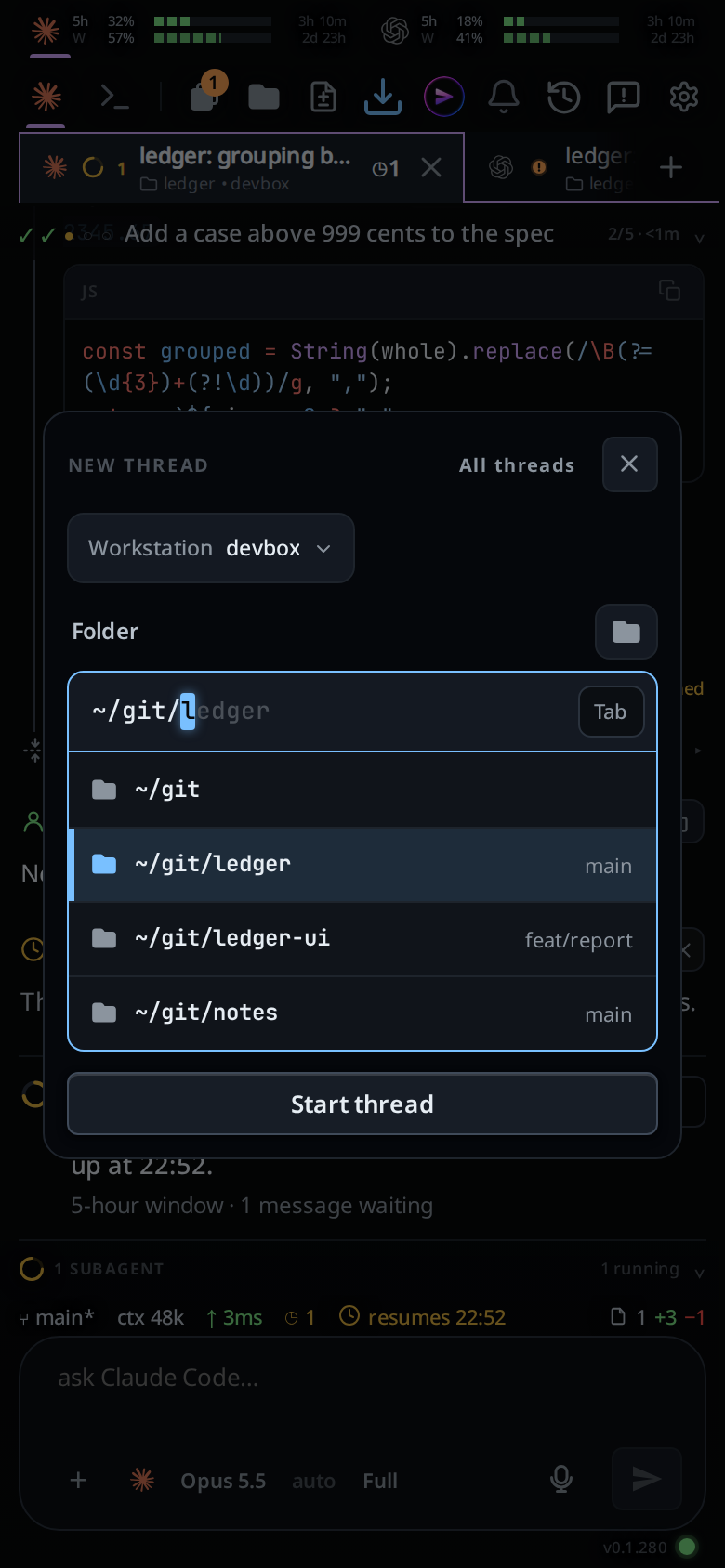
In the VCode app on app.fezu.dev the card starts with the box pick (
.new-box), which readsWorkstationand the box's name: the box the tab is made on. It shows the active tab's box; tap it to pick another. The agents and folders the form offers are that box's. Its last entry, Add or pair a workstation, opens the box list. See work-on-several-boxes.- the plus right after the last tab (
Type or pick a folder in the Folder box (
.new-cwd). It opens on the parent of the current folder, with the folder's name in grey after the caret; Tab, or the Tab chip on a phone, puts it in. See pick-a-folder.Tap Start thread (
.new-thread), or press Enter in the folder box.

On a wide window the tab opens at the end of the pane's tabs too, so nothing you were looking at moves.

What you see
The card has no agent pick. The tab runs the agent of the tab on screen (a new
tab beside Codex work starts on Codex), else the first installed agent the
server offers. To use another agent, switch it in the new tab's composer, or
install and log in to one from the settings sheet's Agents group. When the
workstation has no agent installed, the card shows only the agent list with
Install <agent> rows; see
install-an-agent.
The folder box is seeded with the folder of the tab you were just in, shown
~-short: its parent typed, its name in grey after the caret. Start thread and
Enter take that folder as it is. Backspace deletes from the end, as in a
terminal.
The card opens with the caret already in that box, so the folder list is showing before you touch anything, on a phone as well as on a desktop.
The card closes as soon as you tap Start thread or press Enter, and a toast
with a spinner reads starting thread… until the server answers. More taps or
Enters in that time do nothing, and neither does the new-tab button, so a slow
box still makes one tab. When the thread is created the toast goes, the new tab
is selected, and its name is the folder's last path segment until you rename it.
If you started from the Threads sheet, the sheet closes too.
To close the card without starting anything, tap Close (#newthread-close) or
click anywhere outside it: the dimmed transcript, the tab bar beside it on a
wide screen, or the tab strip. A click in the folder picker the card opened
leaves it up.
The tab lands at the end of its project's tabs, on a phone and on a wide window
alike, so no tab you were reading shifts. On a window at least 760px wide, if
the pointer can hover (a mouse or a trackpad), the composer (#draft) also
takes the caret, so the new tab is ready to type into.
With no folder picked the toast reads pick a folder. A folder that does not
exist is refused by the server: no such folder: /path/you/typed. A path that
is a file, not a directory, is refused the same way. The spinner gives way to
the error toast, and the card stays closed.
In the app, a folder that belongs to a box other than the picked one is refused
before the card closes: that folder is on <box>, not <box>: pick it again. The card stays open. A folder you typed stays as you typed it; a folder
the card filled in is replaced with one on the picked box. See
pick-a-folder.
Options and settings
| Option | Default | What it changes |
|---|---|---|
| Box (app only) | the active tab's box while it is open, else the first open box | Which box the tab is made on, and whose agents and folders the form lists |
| Agent | the agent of the tab on screen, else the first installed agent the server offers | Which CLI runs the tab. The card has no control for it |
| Folder | the current tab's folder, else the server's default cwd | The tab's working directory |
| Model | the last model chosen for the selected agent on this device, else auto | The model the new tab starts with |
| Effort | the last effort chosen for the selected agent on this device, else auto | The reasoning effort the new tab starts with |
Colour new tabs (#tabs-auto-colour) |
off | Gives every new tab a colour. See tab-colours |
Limits and known gaps
- The form has no model or effort control. Change either value in a tab with the
composer's model (
#modelpick, switch-the-model) or effort (#effortpick, set-the-effort) picker; later tabs for that agent use the new choice. The preference belongs to this browser, not to the server or another device. - Only agents the server has adapters for are offered. The test-only
mockagent never appears in the picker. - The folder must exist at creation time. This is checked when the tab is made, not at the first turn, so the error names the typo rather than the agent.
- A new tab is created with no title of its own; the name shown is the folder's basename. A tab opened in a project is named after the project instead.
- The end is not a setting. A new tab always goes to the end of its project.
- Start thread always starts a Worktop tab, whatever folder you pick, even one
inside a project. To start a tab in a project, use the project's
+, which starts it in the project's MAIN folder. - The caret is not taken on a phone, or on a touchscreen tablet wide enough for the wide frame: the soft keyboard would cover the transcript the new tab is there to show. It is not taken from a field you are typing in, or while a sheet, popup or drawer is over the screen, either.
Related
- projects: New project, Edit project, and the
+that skips the card - set-a-default-folder: browse for a folder and make it the default
- pick-a-folder: how the folder box finds folders
- work-on-several-boxes: the box pick in the app
- new-tab-command:
/newfrom the composer - threads-sheet: the manager, which carries the same form
- tab-drawer: the other way in
- the-three-agents: the agents a tab can run
- switch-the-model: the model the form does not set
- install-an-agent: the agents
that read
Install <agent> - reorder-tabs: moving the tab off the end it opened at
- welcome-line: the line and tip the new tab opens on
- switch-tabs: picking a tab, which takes the caret the same way
- type-to-start-a-message: typing into a tab the caret is not in