
Set how hard the agent thinks
Effort is the reasoning dial: how long the agent is willing to think before it
answers. Set it with the button under the composer, or with /effort.
Why you would use it
Mechanical edits do not need the model's deepest pass and you pay for it in time
and tokens. Debugging does. The dial is per tab, so a tab kept for reviews can
sit on high while another sits on low.
How to use it
Tap the effort button (
#effortpick) in the row under the composer, right of the model. It shows the value, orauto.The slash panel opens on Models, with the
Effortslider above the search bar. Drag along it or tap a stop to choose an effort. Tap the effort button again to close the panel. Your draft stays as you wrote it.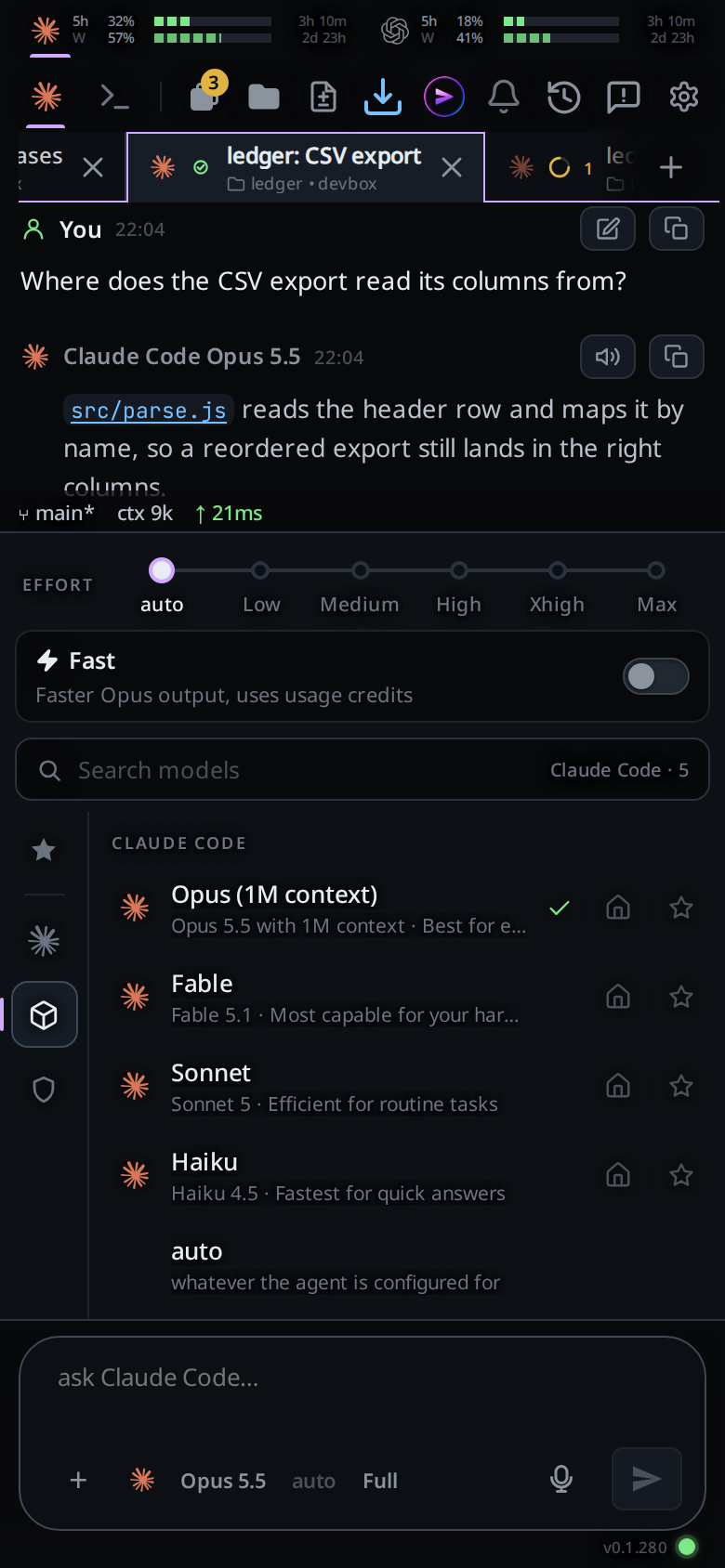
The model button opens this panel too. On a model with effort
levels, an Effort slider sits over the search bar when the panel shows Models:
auto at the left end, then the model's levels. Drag along it or tap a stop. The
effort is set when you let go, and the panel stays open so you can pick a model
next. A model with no levels shows no slider. On a model with fast mode, the
Fast switch sits under the slider: see fast-mode.
Star the current model after setting its effort to save both, with the harness,
in Favourites. You can save the same model at several efforts. Each favourite
shows its effort on the right as a word and a five-bar meter, grey to red.
If the button is enabled but there are no slider stops, it opens the effort list
so you can choose auto.
Or type /effort and the menu becomes the same list of efforts as soon as the
word is finished (no space needed), filtering as you type. It works at the end
of a message already written too: picking an effort there sets it and takes
/effort out of the draft, leaving the message. Send /effort on its own to see
the current value, or /effort high to set it directly.
What you see
- The button's label is the value itself, dimmed and reading
autowhen unset. - The tooltip is
Effort: high, orEffort: let the agent decidewhen nothing is set. - On a model with no effort levels (claude's Haiku, some opencode models) the
button is disabled and its tooltip is
This model has no effort variants. /effortwith no argument answers with a toast:effort: high, oreffort: default.- With nothing set the tick is on
auto. Unlike the model, no agent reports an effort back, so the tick only ever follows what you set.
Options and settings
The levels are the ones the agent's CLI lists for the model this tab runs, plus
default (auto: let the agent decide). With the model on auto, the menu lists
every level any of the agent's models has. On opencode, which takes an effort
only for a model it knows, a tab on auto offers auto alone.
| Agent | Where the levels come from |
|---|---|
| claude | The effort levels the CLI lists per model: low to max on Opus, Fable and Sonnet today, none on Haiku |
| codex | The reasoning efforts the CLI lists per model, which can include ultra |
| opencode | The variants opencode lists for the model, applied as model/variant |
The lists refresh with the models: see update-from-a-tab.
Limits and known gaps
- On claude, effort is a session flag, so changing it restarts the agent process. The next start resumes the same vendor session, so nothing is lost.
- On codex, effort rides on
turn/startand lands on the next message with no restart. - On opencode, choosing a variant the model does not have is refused before it is
sent:
model <id> does not support effort xhigh; supported: auto, low, high. If opencode itself rejects it, the error gains; choose auto or another effort supported by this model. - A model with no effort levels disables the button, with the tooltip
This model has no effort variants. A new tab drops an effort its model has no levels for. - A change made mid-turn applies from the next turn.
- The button is disabled with no tab open.
- Changing the model can change which efforts exist, which is why the model button sits to the left of this one.
Related
- switch-the-model: the button to its left
- fast-mode: the Fast switch under the slider
- slash-menu: the menu both controls open
- the-three-agents: which agents restart to apply a flag
- new-tab-command: the
/newthat copies this tab's effort - status-bar: where a restarted agent reports itself
- update-from-a-tab:
/refresh-modelsasks the CLIs for their levels again - fusion: a Fusion tab sets an effort per model instead