
Pin and mark tabs done
Pin a tab to keep it at the left of the strip. Mark one done to move it out of the strip into its project's Done list. VCode also moves a tab to Done by itself once it has sat idle for three days, its branch has merged, or its folder is gone. Neither stops the agent or touches the conversation.
Why you would use it
You have fifteen tabs open on a phone. The strip scrolls, the drawer is a long list, and the only way to shorten it used to be closing tabs you still wanted nearby. Each state answers one reason a tab is in the way:
- Pin is for the two or three tabs you go back to all day. They stay one tap away, however far the strip is scrolled.
- Done is for finished work. It leaves the strip without a tap per tab, and stays one tap from coming back.
Close is still there, and it is the archive: it stops the agent, the tab leaves every list but the resume screen, and Reopen brings it back (close-and-reopen-tabs). Done is the step before Close, so there is no separate Archive. Moving tabs between sections by dragging them is left out: on a phone the drag already reorders tabs.
How to use it
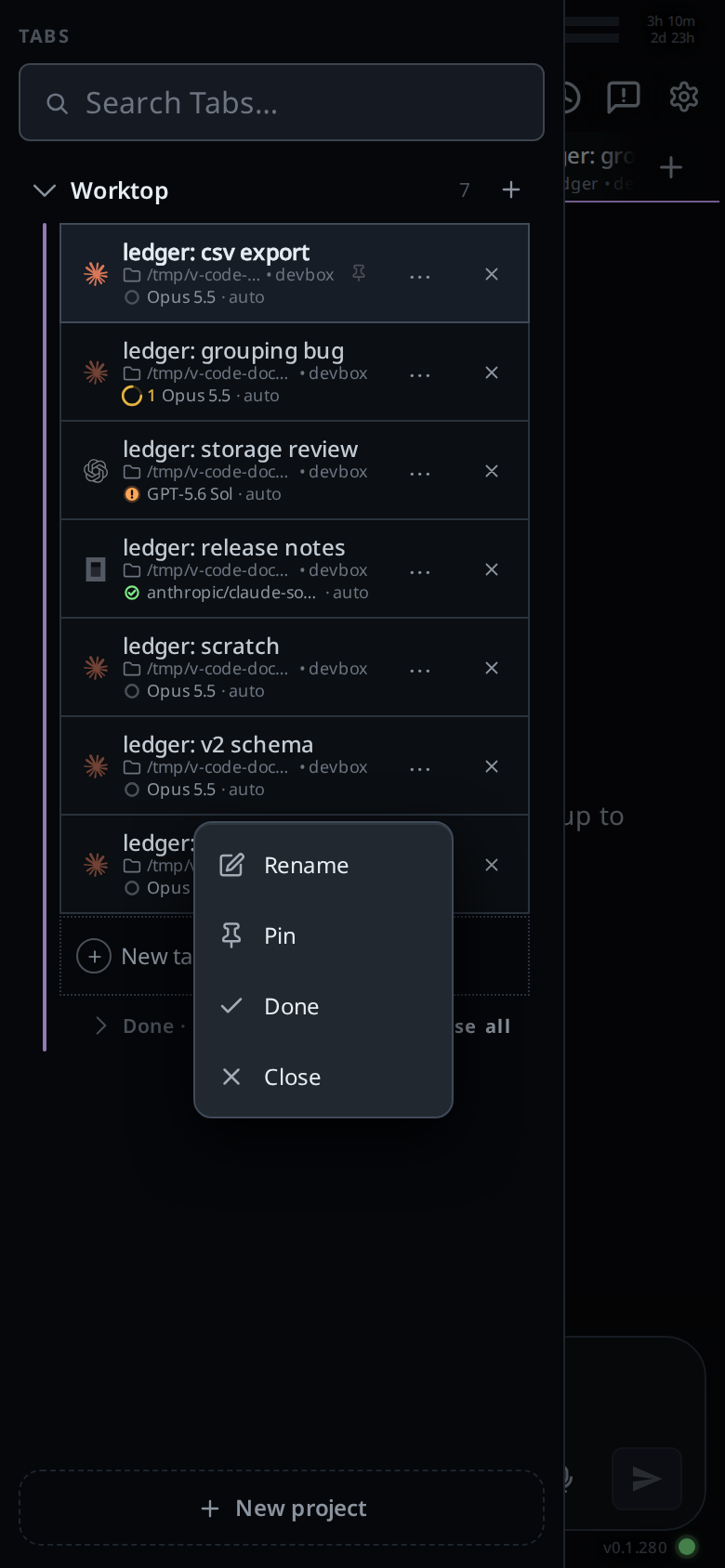
- Open the tab menu (
#tab-menu) for a tab:- tap the
⋯button (More for <tab>) on its row in the tab bar (#drawer) or in the Threads sheet (#sessions), or - on a computer, right-click the tab in the strip or its row in the Tabs column. A file tab's right-click menu has only Close.
- tap the
- Pick one:
- Pin (
#tab-menu-pin), or Unpin on a pinned tab. - Done (
#tab-menu-done), or Not done on a tab in Done. - Close (
#tab-menu-close), as the cross does. On a tab that is working it reads Close and stop the turn, and picking it closes the tab at once.
- Pin (
- A toast says what happened, with Undo for five seconds. Undo puts the tab back the way it was.
From the composer, on the tab you are in:
/pinpins it, or unpins a pinned one./donemoves it to Done.
To bring a tab back early, open its project in the tab bar, open the Done list under the tabs, and tap the tab's row. It comes back to the strip and opens. Sending a done tab a message brings it back too, from any device.
To clear out a project's Done list, tap Close all on the Done heading. It asks first, then closes every tab in the list.
What you see
A pinned tab sits at the left of its project's strip, with a small pin. In the tab bar its row is at the top of its project. Dragging still reorders tabs, but a pinned tab stays left of every tab that is not.

Marking done the tab you are in moves you to the tab beside it, as a close does. Its draft stays.
In the tab bar, an open project lists its tabs, then a Done · N heading, shut until you tap it. Your device remembers whether you opened it. A done row says why it is there:
done,idle 3 days,branch mergedorfolder removed.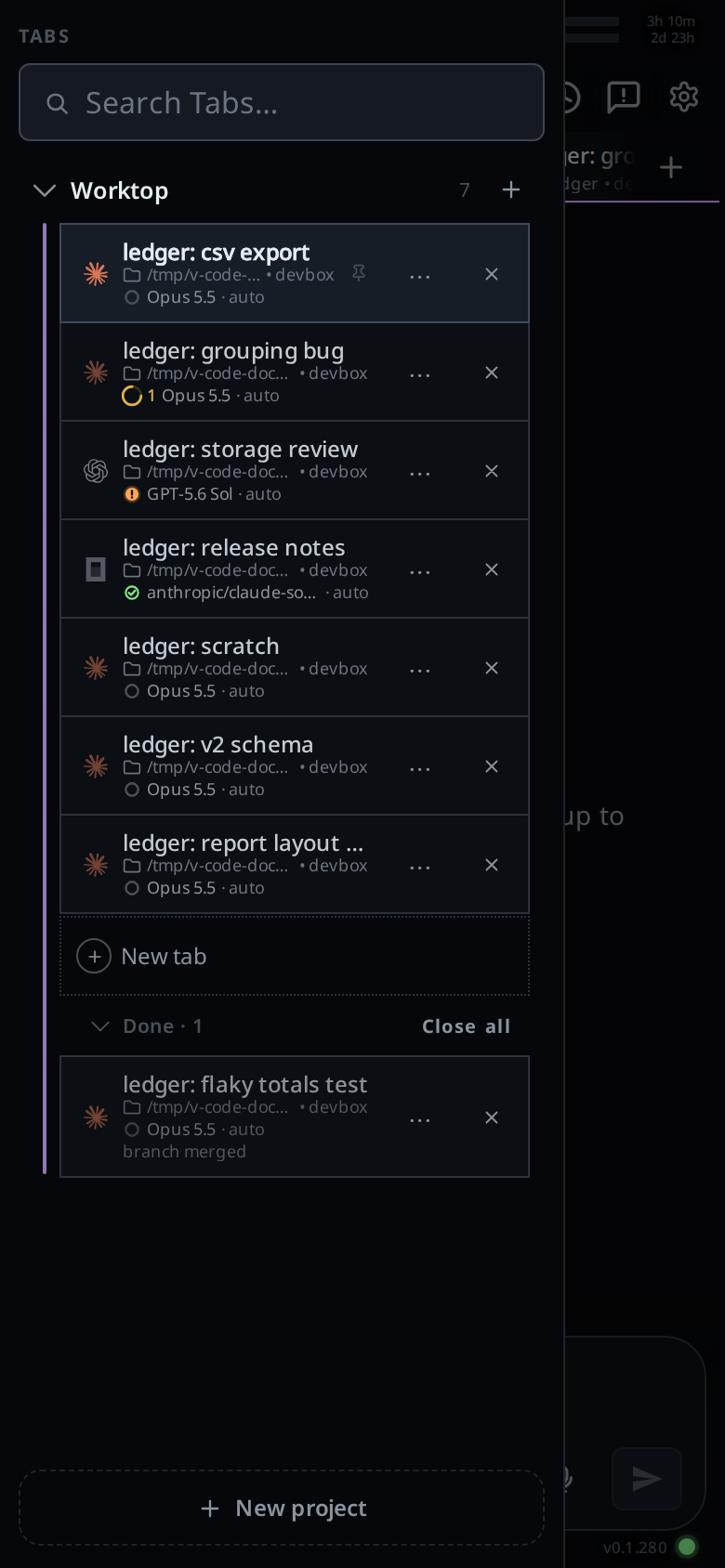
The Threads sheet lists every open tab as before. A done one says
doneon its meta line.When VCode moves the tab you are looking at to Done, or another device does, you move to the tab beside it and a toast says
<tab> moved to Done, with Undo.A done tab sends no "done" or "needs you" notifications, and it leaves the count on the Tabs button and its project's count and dot.
Options and settings
| Option | Default | What it changes |
|---|---|---|
Move finished tabs to Done (#tabs-auto-done), in the cog's Tabs group |
on | Whether VCode moves quiet tabs to Done by itself |
VCode moves a tab to Done by itself only when all of these hold:
- it is not pinned and not an Agent Commander;
- nothing runs in it: no turn, no queued message, no background agent or shell, no approval waiting;
- you have read it: its last turn did not end on a question for you, and you have opened it since it finished.
Then any one of these moves it:
| Reason | Shown as |
|---|---|
| Nothing has happened in it for 3 days: no message, no finished turn | idle 3 days |
Its branch was merged into the default branch with a merge commit, or its pull request on GitHub merged after your last message (needs the gh CLI, signed in) |
branch merged |
| Its folder no longer exists, for example a worktree you removed after merging | folder removed |
Limits and known gaps
- A branch merged by a fast-forward, or squashed into the default branch
outside GitHub, is not seen as merged. VCode asks git and
ghabout each tab at most once every 10 minutes. - When you first update to a release with this, every quiet tab already idle for three days moves to Done at once.
- Bringing a tab back from Done counts as activity, so it has three more days before it can move there again.
- Once you bring a tab back from Done that moved for
folder removedorbranch merged, by Undo, by opening it from the Done list or by sending it a message, VCode no longer moves it for that reason. It still moves it after three idle days. - Snooze is removed. A tab that was snoozed when your computer updated is back in the strip, and it does not move to Done as idle until it next does something.
- The Agent Commander cannot be pinned or marked done: it is in no strip, and the top bar opens it.
- Agents cannot pin or mark tabs done with
v-code tab.
Related
- close-and-reopen-tabs: Close, the archive
- tab-drawer: the tab bar with the Done list
- threads-sheet: the other place with the
⋯menu - switch-tabs: the strip a pinned tab leads
- reorder-tabs: dragging, and why a pinned tab stays left
- tab-status: what a done tab leaves out of the count
- projects: each project has its own Done list
- thread-finished-notification: the notifications a done tab does not send